FabCon is coming to Atlanta
Join us at FabCon Atlanta from March 16 - 20, 2026, for the ultimate Fabric, Power BI, AI and SQL community-led event. Save $200 with code FABCOMM.
Register now!- Power BI forums
- Get Help with Power BI
- Desktop
- Service
- Report Server
- Power Query
- Mobile Apps
- Developer
- DAX Commands and Tips
- Custom Visuals Development Discussion
- Health and Life Sciences
- Power BI Spanish forums
- Translated Spanish Desktop
- Training and Consulting
- Instructor Led Training
- Dashboard in a Day for Women, by Women
- Galleries
- Data Stories Gallery
- Themes Gallery
- Contests Gallery
- QuickViz Gallery
- Quick Measures Gallery
- Visual Calculations Gallery
- Notebook Gallery
- Translytical Task Flow Gallery
- TMDL Gallery
- R Script Showcase
- Webinars and Video Gallery
- Ideas
- Custom Visuals Ideas (read-only)
- Issues
- Issues
- Events
- Upcoming Events
The Power BI Data Visualization World Championships is back! Get ahead of the game and start preparing now! Learn more
- Power BI forums
- Forums
- Get Help with Power BI
- DAX Commands and Tips
- Re: Excel DAX query with bridge table using CROSSF...
- Subscribe to RSS Feed
- Mark Topic as New
- Mark Topic as Read
- Float this Topic for Current User
- Bookmark
- Subscribe
- Printer Friendly Page

- Mark as New
- Bookmark
- Subscribe
- Mute
- Subscribe to RSS Feed
- Permalink
- Report Inappropriate Content
Excel DAX query with bridge table using CROSSFILTER
Hi, this is my second take on a problem I have using the correct syntax on an Excel DAX query: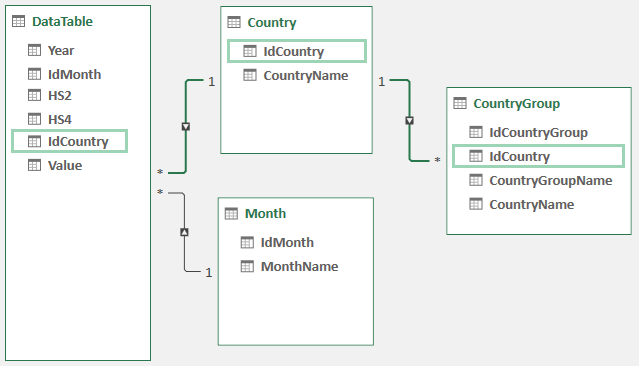
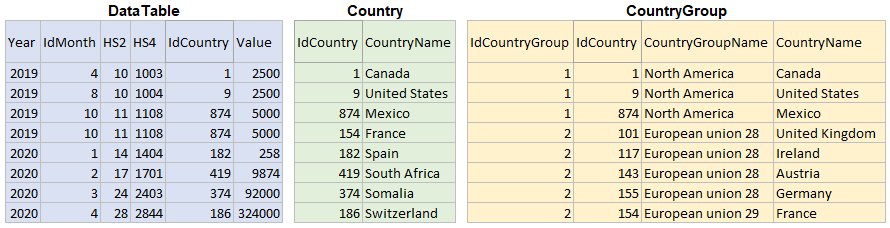
I did a working measure in powerpivot using a pivot table with filters:
CountryGrp:=CALCULATE(SUM(DataTable[Value]);CROSSFILTER(DataTable[IdCountry];Country[IdCountry];Both);CROSSFILTER(Country[IdCountry];CountryGroup[IdCountry];Both))Can I duplicate this behavior with a DAX query?
I need to SUM the values where IdCountryGroup = 1 and Years = 2019
The result would be:
2019 North America 15000
This is where I'm at with no success:
EVALUATE
ADDCOLUMNS (
    SUMMARIZE ( DataTable, DataTable[Year] ),
    "Val",
        CALCULATE (
            SUM ( DataTable[Value] ),
            CROSSFILTER ( DataTable[IdCountry], Country[IdCountry], BOTH ),
            CROSSFILTER ( Country[IdCountry], CountryGroup[IdCountry], BOTH ),
            FILTER ( CountryGroup, CountryGroup[IdCountryGroup] = 1 )
        )
)
And how can I put a filter in 2 different tables?
Thank you for your help!
Solved! Go to Solution.


- Mark as New
- Bookmark
- Subscribe
- Mute
- Subscribe to RSS Feed
- Permalink
- Report Inappropriate Content
@JFGrenier Sure, that's the best decision, you may write a complex DAX that might break tomorrow if not written considering every possible detail, but a data model that's perfect would always give you the required soution with minimal DAX!


- Mark as New
- Bookmark
- Subscribe
- Mute
- Subscribe to RSS Feed
- Permalink
- Report Inappropriate Content
Weird that my previous reply disappeared without any trace ...🤔
@JFGrenier IMHO, in order to propagate filter from multiple(*) side to one(1) side of a relationship, expanded table would be a preferable choice.
As to your issue, filters on CountryGroup(*) can take effect to Country(1) this way,
CALCULATETABLE ( VALUES ( Country[IdCountry] ), CountryGroup )
then such a filtering propagates naturally from Country(1) to DataTable(*) subsequently.
Pls try measure
Total Values :=
CALCULATE (
    SUM ( DataTable[Value] ),
    CALCULATETABLE ( VALUES ( Country[IdCountry] ), CountryGroup )
)
| Thanks to the great efforts by MS engineers to simplify syntax of DAX! Most beginners are SUCCESSFULLY MISLED to think that they could easily master DAX; but it turns out that the intricacy of the most frequently used RANKX() is still way beyond their comprehension! |
DAX is simple, but NOT EASY! |
- Mark as New
- Bookmark
- Subscribe
- Mute
- Subscribe to RSS Feed
- Permalink
- Report Inappropriate Content
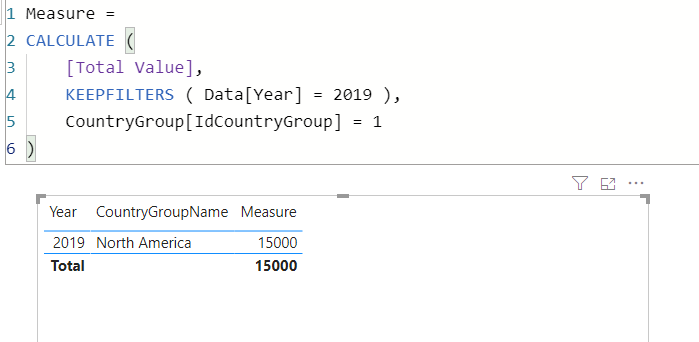
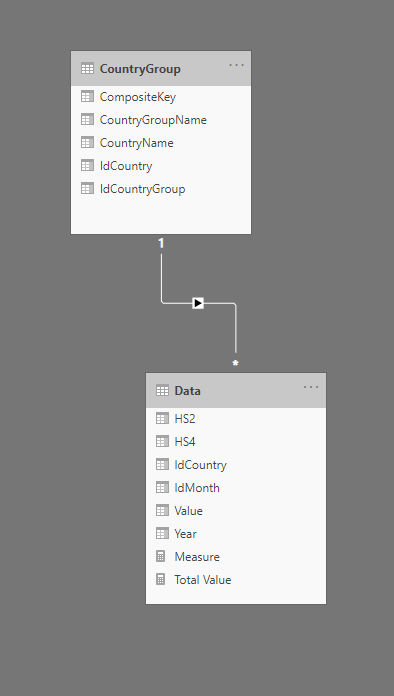
@JFGrenier Just change the data model a little bit and the DAX that you have to write will be short and simple, working PBI file is attached below my signature:
- Mark as New
- Bookmark
- Subscribe
- Mute
- Subscribe to RSS Feed
- Permalink
- Report Inappropriate Content
Hello AntrikshSharma!
And thank you for your reply!
There's a specific reason for the table CountryGroup. Sorry for not mentionning it before. It's because a country can be in multiple country group. For example: Egypt can be in the country group Africa and also in the country group North Africa. What you propose would create a many to many relationship.
Thank's again!
- Mark as New
- Bookmark
- Subscribe
- Mute
- Subscribe to RSS Feed
- Permalink
- Report Inappropriate Content
@JFGrenier Still you should focus on changing the model, create 2 rows for Egypt in that case, with a unique key for both?
- Mark as New
- Bookmark
- Subscribe
- Mute
- Subscribe to RSS Feed
- Permalink
- Report Inappropriate Content
Let's say that Egypt is in 3 CountryGroup, thing is that I would have to copy the data associated with Egypt 2 more times with a different Id. I'm already at 14 millions rows in the DataTable and for a 32 bits system, I think it's near maximum. But what if I add multiple Id column in my CountryGroup table. I'll check how many country can be in multiple CountryGroup. If there are 15 country, I'd just add 15 columns of Id's and change the relationship accordingly. Do you think the DAX function RELATED could work? Or do you know of any other function that can change relationships? My DAX queries are built at run time via an Excel userform and trapping these exceptions would be easy. You point me in a new direction! Changing the model maybe my only solution!
But before that, I'll give one more shot at this query:
Where (syntax) could I add a filter to the DataTable[Year]=2019 && DataTable[HS2]=10 in the query below?
In the Summarize function, in the Calculate or else???
EVALUATE
ADDCOLUMNS (
    SUMMARIZE ( DataTable, DataTable[Year] ),
    "Val",
        CALCULATE (
            SUM ( DataTable[Value] ),
            CROSSFILTER ( DataTable[IdCountry], Country[IdCountry], BOTH ),
            CROSSFILTER ( Country[IdCountry], CountryGroup[IdCountry], BOTH ),
            FILTER ( CountryGroup, CountryGroup[IdCountryGroup] = 1 )
        )
)
Thank's again!
- Mark as New
- Bookmark
- Subscribe
- Mute
- Subscribe to RSS Feed
- Permalink
- Report Inappropriate Content
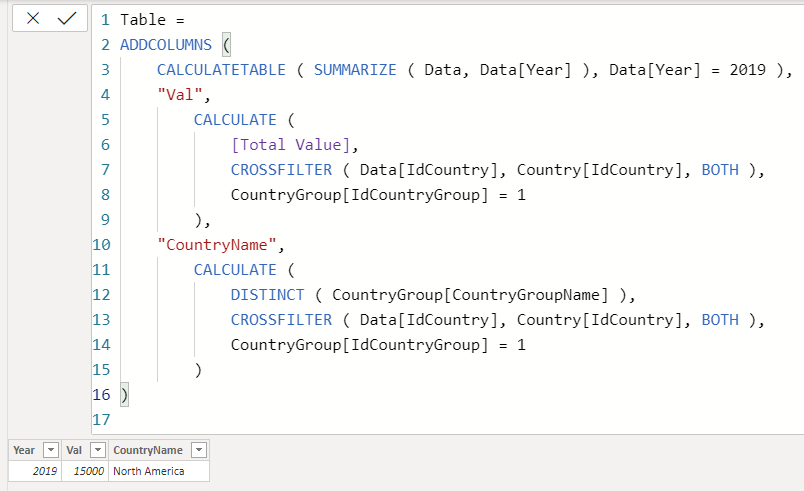
@JFGrenier Try this: for countryname in case there are more than 1 value you can use CONCATENATEX ( CALCULATETABLE construct. The file is below my signature:
Table =
ADDCOLUMNS (
    CALCULATETABLE ( SUMMARIZE ( Data, Data[Year] ), Data[Year] = 2019 ),
    "Val",
        CALCULATE (
            [Total Value],
            CROSSFILTER ( Data[IdCountry], Country[IdCountry], BOTH ),
            CountryGroup[IdCountryGroup] = 1
        ),
    "CountryName",
        CALCULATE (
            DISTINCT ( CountryGroup[CountryGroupName] ),
            CROSSFILTER ( Data[IdCountry], Country[IdCountry], BOTH ),
            CountryGroup[IdCountryGroup] = 1
        )
)
- Mark as New
- Bookmark
- Subscribe
- Mute
- Subscribe to RSS Feed
- Permalink
- Report Inappropriate Content
Hello Antriksh,
I tried your latest DAX solution in my real 'Data model' (what I showed is a scale down and translated version).
Had to adapt it a bit for DAX studio in french and checked several times to match your code!
The filter on IdCountryGroup do not seem to have any effect... The country group name changes accordingly but the returned values are always the same. It's the sum of all values of the Data table for the filtered year. Guess I will have to change my data model.
Thank you for your time and knowledge!
- Mark as New
- Bookmark
- Subscribe
- Mute
- Subscribe to RSS Feed
- Permalink
- Report Inappropriate Content
@JFGrenier Sure, that's the best decision, you may write a complex DAX that might break tomorrow if not written considering every possible detail, but a data model that's perfect would always give you the required soution with minimal DAX!
- Mark as New
- Bookmark
- Subscribe
- Mute
- Subscribe to RSS Feed
- Permalink
- Report Inappropriate Content
I personally avoid leveraging CROSSFILTER as much as possible, especially in a complex data model.
As to your model, in order to propagate filters on CountryGroup(*) to Country(1), expanded table is an excellent choice,
CALCULATETABLE ( VALUES ( Country[IdCountry] ), CountryGroup )
Furthermore, filters on Country(1) or Month(1) propagate in a natual way to Data(*) for any calculations; thus, I'd author a measure this way,
Total Values =
CALCULATE (
    SUM ( Data[Value] ),
    CALCULATETABLE ( VALUES ( Country[IdCountry] ), CountryGroup )
)
| Thanks to the great efforts by MS engineers to simplify syntax of DAX! Most beginners are SUCCESSFULLY MISLED to think that they could easily master DAX; but it turns out that the intricacy of the most frequently used RANKX() is still way beyond their comprehension! |
DAX is simple, but NOT EASY! |

- Mark as New
- Bookmark
- Subscribe
- Mute
- Subscribe to RSS Feed
- Permalink
- Report Inappropriate Content
@JFGrenier - Not quite sure I understand the full situation here. If you have the same data model in both places, Excel and Power BI the DAX should be the same.
Not really enough information to go on, please first check if your issue is a common issue listed here: https://community.powerbi.com/t5/Community-Blog/Before-You-Post-Read-This/ba-p/1116882
Also, please see this post regarding How to Get Your Question Answered Quickly: https://community.powerbi.com/t5/Community-Blog/How-to-Get-Your-Question-Answered-Quickly/ba-p/38490
The most important parts are:
1. Sample data as text, use the table tool in the editing bar
2. Expected output from sample data
3. Explanation in words of how to get from 1. to 2.
Follow on LinkedIn
@ me in replies or I'll lose your thread!!!
Instead of a Kudo, please vote for this idea
Become an expert!: Enterprise DNA
External Tools: MSHGQM
YouTube Channel!: Microsoft Hates Greg
Latest book!: DAX For Humans
DAX is easy, CALCULATE makes DAX hard...

- Mark as New
- Bookmark
- Subscribe
- Mute
- Subscribe to RSS Feed
- Permalink
- Report Inappropriate Content
@JFGrenier , Dax is the same at both places, should work.
Can you share sample data and sample output in table format? Or a sample pbix after removing sensitive data.

Helpful resources

Power BI Dataviz World Championships
The Power BI Data Visualization World Championships is back! Get ahead of the game and start preparing now!

Power BI Monthly Update - December 2025
Check out the December 2025 Power BI Holiday Recap!

FabCon Atlanta 2026
Join us at FabCon Atlanta, March 16-20, for the ultimate Fabric, Power BI, AI and SQL community-led event. Save $200 with code FABCOMM.

| User | Count |
|---|---|
| 19 | |
| 13 | |
| 9 | |
| 4 | |
| 4 |


| User | Count |
|---|---|
| 30 | |
| 26 | |
| 17 | |
| 11 | |
| 10 |


