cancel
Showing results for 
Search instead for 
Did you mean: 

We've captured the moments from FabCon & SQLCon that everyone is talking about, and we are bringing them to the community, live and on-demand. Starts on April 14th. Register now

Reply
Giovani
Helper I
Helper I

Dynamic filter based in multiple columns and criteria

I am struggling with something that may be simple to solve. By year and month, I want to make a dynamic bar chart to present counts by a distinct ID that fits criteria based on columns Filter1 and Filter2. For simplicity, I am only using as an example a few lines from a large table, assuming all are from the same year and month.

ID

Filter1

Filter2

ID1

A

D

ID1

B

D

ID2

A

F

ID2

B

E

ID3

A

D

ID3

B

F

ID4

B

D

ID4

C

D

ID5

B

D

ID5

C

E

ID6

A

D

ID6

B

D

ID6

C

D


An example of questions I am trying to answer and visualize are

1-How many times A and B were concomitantly present in an ID? Answer = 4 (ID1;ID2;ID3;ID6). This would later be used to answer a similar question applied to B and C, or for the three of them A, B, and C.

2- How many times A and B were concomitantly present in an ID, and A had Filter2= D and B had Filter2=  D?

Answer= 2 (ID1; ID6)

2- How many times A and B were concomitantly present in an ID, and A had Filter2=  D and B had Filter2=  E?

Answer= 0


Any help in how I could do this is welcome!

1 ACCEPTED SOLUTION
wdx223_Daniel
Community Champion
Community Champion

@Giovani might these code help


ID_Count:=COUNTROWS (
    FILTER (
        VALUES ( SampleData[ID] ),
        VAR _Filter1 =
            CALCULATETABLE (
                VALUES ( SampleData[Filter1] ),
                ALLEXCEPT ( SampleData, SampleData[ID] )
            )
        RETURN
            AND ( CONTAINSROW ( _Filter1, "A" ), CONTAINSROW ( _Filter1, "B" ) )
    )
)
----------------------------
ID_Count2:=COUNTROWS (
    FILTER (
        VALUES ( SampleData[ID] ),
        VAR _Filter1 =
            CALCULATETABLE (
                SUMMARIZE ( SampleData, SampleData[Filter1], SampleData[Filter2] ),
                ALLEXCEPT ( SampleData, SampleData[ID] )
            )
        RETURN
            AND ( CONTAINSROW ( _Filter1, "A", "D" ), CONTAINSROW ( _Filter1, "B", "D" ) )
    )
)
----------------------
ID_Count3:=COUNTROWS (
    FILTER (
        VALUES ( SampleData[ID] ),
        VAR _Filter1 =
            CALCULATETABLE (
                SUMMARIZE ( SampleData, SampleData[Filter1], SampleData[Filter2] ),
                ALLEXCEPT ( SampleData, SampleData[ID] )
            )
        RETURN
            AND ( CONTAINSROW ( _Filter1, "A", "D" ), CONTAINSROW ( _Filter1, "B", "E" ) )
    )
)
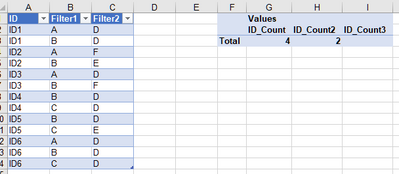
 

wdx223_Daniel_0-1603939991712.png


View solution in original post

2 REPLIES 2
wdx223_Daniel
Community Champion
Community Champion

@Giovani might these code help


ID_Count:=COUNTROWS (
    FILTER (
        VALUES ( SampleData[ID] ),
        VAR _Filter1 =
            CALCULATETABLE (
                VALUES ( SampleData[Filter1] ),
                ALLEXCEPT ( SampleData, SampleData[ID] )
            )
        RETURN
            AND ( CONTAINSROW ( _Filter1, "A" ), CONTAINSROW ( _Filter1, "B" ) )
    )
)
----------------------------
ID_Count2:=COUNTROWS (
    FILTER (
        VALUES ( SampleData[ID] ),
        VAR _Filter1 =
            CALCULATETABLE (
                SUMMARIZE ( SampleData, SampleData[Filter1], SampleData[Filter2] ),
                ALLEXCEPT ( SampleData, SampleData[ID] )
            )
        RETURN
            AND ( CONTAINSROW ( _Filter1, "A", "D" ), CONTAINSROW ( _Filter1, "B", "D" ) )
    )
)
----------------------
ID_Count3:=COUNTROWS (
    FILTER (
        VALUES ( SampleData[ID] ),
        VAR _Filter1 =
            CALCULATETABLE (
                SUMMARIZE ( SampleData, SampleData[Filter1], SampleData[Filter2] ),
                ALLEXCEPT ( SampleData, SampleData[ID] )
            )
        RETURN
            AND ( CONTAINSROW ( _Filter1, "A", "D" ), CONTAINSROW ( _Filter1, "B", "E" ) )
    )
)


wdx223_Daniel_0-1603939991712.png


Many thanks to @wdx223_Daniel this is perfect and is exactlly what I was looking for!

Helpful resources

Announcements
New to Fabric survey Carousel

New to Fabric Survey

If you have recently started exploring Fabric, we'd love to hear how it's going. Your feedback can help with product improvements.

Power BI DataViz World Championships carousel

Power BI DataViz World Championships - June 2026

A new Power BI DataViz World Championship is coming this June! Don't miss out on submitting your entry.

Join our Fabric User Panel

Join our Fabric User Panel

Share feedback directly with Fabric product managers, participate in targeted research studies and influence the Fabric roadmap.

March Power BI Update Carousel

Power BI Community Update - March 2026

Check out the March 2026 Power BI update to learn about new features.