Join us at FabCon Atlanta from March 16 - 20, 2026, for the ultimate Fabric, Power BI, AI and SQL community-led event. Save $200 with code FABCOMM.
Register now!Learn from the best! Meet the four finalists headed to the FINALS of the Power BI Dataviz World Championships! Register now
Hey, I need some help writing a DAX measure for a calculation.
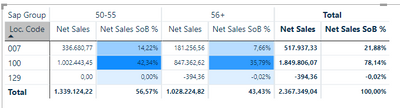
I need to divide the net sales of any location (loc. code) for a specific Sap Group, by the sum of net sales in that Sap Group.
I have used the following measure but the problem is that it divides the net sales cell value by the net sales total value.
Net Sales SoB =
DIVIDE(SUM(sales[NET_SALES]), CALCULATE(SUM(sales[NET_SALES]), ALLSELECTED()))
eg, for loc. code 100 and Sap Group 50-55, I want the net sales sob % to be 1.002.443,45 / 1.339.124,22 = ~75%
Solved! Go to Solution.
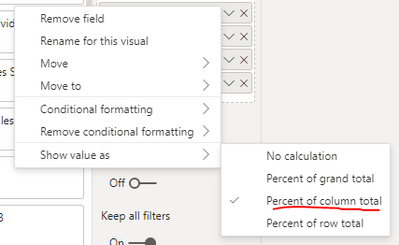
No special measure was required.
All I had to do was to change the following option from the field tab.
No special measure was required.
All I had to do was to change the following option from the field tab.
Hi:
I beleive you can change where it says ALLSELECTED to REMOVEFILTERS()
A lot of times I have a simple measure for sales like Sales Amount = SUM(Sales[Net Sales]) first then use
DIVIDE([Sales Amount],
CALCULATE([Sales Amount], REMOVEFILTERS(Location[Code])))
another way can be:
DIVIDE(SUMX( Sales,[Net Sales),
SUMX(ALLSELECTED(Sales), [Net Sales]))
Thanks for that but the result is not correct yet.
I need to divide column cell value by column total.
Share feedback directly with Fabric product managers, participate in targeted research studies and influence the Fabric roadmap.
Check out the February 2026 Power BI update to learn about new features.
| User | Count |
|---|---|
| 6 | |
| 3 | |
| 3 | |
| 3 | |
| 2 |
| User | Count |
|---|---|
| 8 | |
| 7 | |
| 7 | |
| 7 | |
| 6 |