Get certified for free when you join Fabric Data Days 2026 and dive into Fabric, Power BI, SQL, AI, and other essential data skills.
Join nowData Days is here! Join us now for 60+ days of learning, challenges, and connection. Learn more
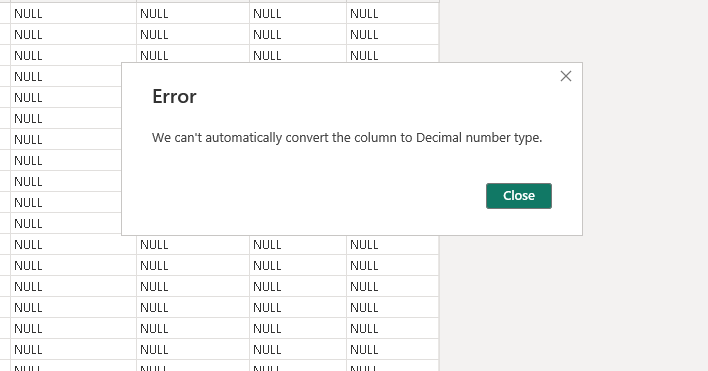
*I have trouble converting the data type of Column Amount in Source ABC to Decial/Numbers for this tutorial(help needed),
see data source:https://drive.google.com/file/d/1VZJv8sPPYPcLiRKyO1fkEqbcsX-dz10P/view?usp=sharing . PBIX:https://drive.google.com/file/d/1wfjbLI7nBLQU5-Qs5rGHOL2XP4uc0UR9/view?usp=sharing
I am trying to include rows in a Dax calculation from a mapping table(Pivot) to a fact table(ABC). The DAX is going to look at specific rows and bring those forward. The big issue is some rows are not present in the Fact table. I also need those rows to be displayed but their values to be manipulated.
An example is row "Interco capital returned", which is not in the Fact Table(ABC), it should display a fixed value of "678"
TotalAmountForSelectedItems5 =
CALCULATE(
SUM('ABC'[Amount]), // Corrected Column Reference
'ABC'[Roll_Up_Function] IN {
"Cash flow from ops - management",
"Cash flow from trading",
"Depreciation and amortisation",
"IPEP expense",
"Disposals & impairment of fixed assets",
"Profit on disposal of pooling equipment",
"Scrapped pooling equipment",
"Impairment or valuation adjustment of pooling equipment",
"Disposals or valuation adjustments of other fixed assets",
"Other cash flow from trading adjustments",
"Share-based payments expense",
"Working capital mvts incl. provisions",
"Working capital mvts excl. provisions",
"Debtor movements",
"Creditor movements",
"Inventory movements",
"Prepayment movements",
"Provision movements",
"Change in capex creditors",
"Change in loss compensation balances",
"Interco interest and guarantee fees",
"Interco cash flows",
"Interco royalties",
"Statutory reallocations",
"Internal restructuring",
"Interco dividends Total",
"Change in interco balances",
"Change in interco recharge clearing",
"FX on interco debt",
"Interco capital returned"
}
)
@amitchandak @jpessoa8 @lbendlin
1. Power BI is throwing that decimal error because your source data actually contains the word "NULL" typed out. The engine can't do math on letters. You also have currency symbols ("R") and spaces muddying up the numbers.
Open Power Query Editor.
Find the Amount column in your ABC table. Make sure its data type is temporarily set to Text.
Right-click the header and select Replace Values. Find NULL and replace it with nothing (leave the bottom box blank).
Do another Replace Values to remove the R and any spaces.
Change the column's data type to Decimal Number.
2. You can delete any relationship lines between your Pivot table and your ABC fact table in the model view. We are going to bypass the physical model entirely.
Drag Pivot[Roll_Up_Function] onto the rows of your matrix visual to generate the headers.
Did I solved your problem? Please mark this as solved and giev me a kudos.
Rows like "Interco capital returned" disappear because your visual is driven by the fact table (ABC), so any row with no matching fact data simply doesn't show. The fix is to drive the rows from your mapping/template table (the Pivot) instead, and use a measure for the value - then every template row renders, even ones with no transactions, and you can override specific ones with a fixed value.
1) Put the row label from the mapping table (not ABC) on the rows of the matrix, so all template rows are listed.
2) Have a relationship from the mapping table to ABC on the matching key (or use TREATAS in the measure if a physical relationship isn't possible).
3) Write the value as a measure that returns the fact sum normally but a fixed value for the special rows:
Value =
SWITCH(
TRUE(),
SELECTEDVALUE(Map[Row]) = "Interco capital returned", 678,
[TotalAmountForSelectedItems5] // your existing SUM over ABC
)
Because the rows come from the mapping table, "Interco capital returned" shows up even though it isn't in ABC, and the SWITCH gives it the fixed 678 while every other row keeps its calculated total.
On the separate "can't convert Amount to Decimal" note: that's usually a locale / decimal-separator issue - use Transform > Data Type > Using Locale, pick Decimal Number with the locale that matches the source (or strip currency symbols/spaces first).
Don't miss out on Data Days, June 15 through August 7. Learn Fabric, Power BI, SQL, AI and more.
Check out the May 2026 Power BI update to learn about new features.
| User | Count |
|---|---|
| 3 | |
| 2 | |
| 2 | |
| 1 | |
| 1 |
| User | Count |
|---|---|
| 6 | |
| 4 | |
| 3 | |
| 3 | |
| 3 |