Join us at FabCon Atlanta from March 16 - 20, 2026, for the ultimate Fabric, Power BI, AI and SQL community-led event. Save $200 with code FABCOMM.
Register now!Vote for your favorite vizzies from the Power BI Dataviz World Championship submissions. Vote now!
Hello everyone,
I'm developing a participation analysis, and I would like to obtain 2 different measures:
How can I get the second measure?
The analysis is for four years, and I need to know each selected period the new participating companies.
Thanks.
Regards,
Solved! Go to Solution.
@jacob2102 , refer I have used customer ID and Isblank and monthly measures, Same can help you to build
Customer Retention Part 1:
https://community.powerbi.com/t5/Community-Blog/Customer-Retention-Part-1-Month-on-Month-Retention/b...
Hi @jacob2102 ,
Is your problem solved, you can also try the following:
I created some data:
Here are the steps you can follow:
1. Create calculated table.
2. Create measure.
Flag =
var _min=MIN('Date'[Date])
var _max=MAX('Date'[Date])
return
IF(
MAX('Table'[date])>=_min&&MAX('Table'[date])<=_max,1,0)Number of participants =
CALCULATE(DISTINCTCOUNT('Table'[companies]),ALLSELECTED('Table'))Number of non-participants =
var _all=CALCULATE( DISTINCTCOUNT('Table'[companies]),ALL('Table'))
return
_all -[Number of participants]
3. Place [Flag]in Filters, set is=1, apply filter.
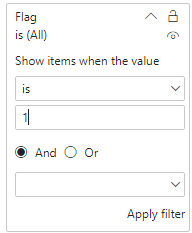
4. Result:
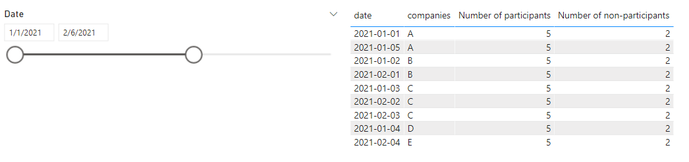
If I have misunderstood your meaning, please provide your desired output and your pbix without privacy information.
Best Regards,
Liu Yang
If this post helps, then please consider Accept it as the solution to help the other members find it more quickly
Hi @jacob2102 ,
Is your problem solved, you can also try the following:
I created some data:
Here are the steps you can follow:
1. Create calculated table.
2. Create measure.
Flag =
var _min=MIN('Date'[Date])
var _max=MAX('Date'[Date])
return
IF(
MAX('Table'[date])>=_min&&MAX('Table'[date])<=_max,1,0)Number of participants =
CALCULATE(DISTINCTCOUNT('Table'[companies]),ALLSELECTED('Table'))Number of non-participants =
var _all=CALCULATE( DISTINCTCOUNT('Table'[companies]),ALL('Table'))
return
_all -[Number of participants]
3. Place [Flag]in Filters, set is=1, apply filter.
4. Result:
If I have misunderstood your meaning, please provide your desired output and your pbix without privacy information.
Best Regards,
Liu Yang
If this post helps, then please consider Accept it as the solution to help the other members find it more quickly
@jacob2102 , refer I have used customer ID and Isblank and monthly measures, Same can help you to build
Customer Retention Part 1:
https://community.powerbi.com/t5/Community-Blog/Customer-Retention-Part-1-Month-on-Month-Retention/b...
Thanks for your answer.
I am going to create an aditional column to identify the first participation date and then create a relationship to exclud the dates.
Thanks.
Regards,
Vote for your favorite vizzies from the Power BI World Championship submissions!
If you love stickers, then you will definitely want to check out our Community Sticker Challenge!
Check out the January 2026 Power BI update to learn about new features.
| User | Count |
|---|---|
| 7 | |
| 6 | |
| 3 | |
| 3 | |
| 2 |
| User | Count |
|---|---|
| 16 | |
| 11 | |
| 11 | |
| 6 | |
| 5 |