Join us at FabCon Atlanta from March 16 - 20, 2026, for the ultimate Fabric, Power BI, AI and SQL community-led event. Save $200 with code FABCOMM.
Register now!Get Fabric Certified for FREE during Fabric Data Days. Don't miss your chance! Request now
How can I create a DAX to remove the rows from the table to comply with the data retentino policy of 60 days? I have been refreshing a CSV file with weekly new data and would like to run a function to remove all data order than 60 days. I found some references to create new table with rows removed, but that's not applicable.
Hi
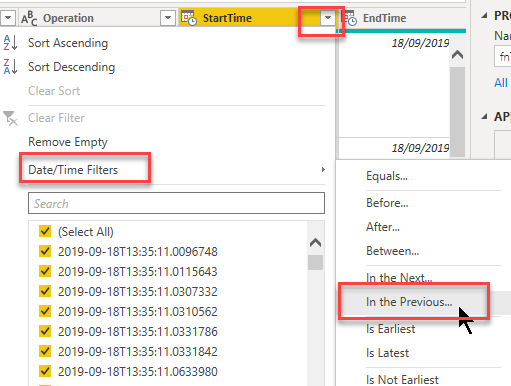
you can set a "relative date filter" in the query editor like so:
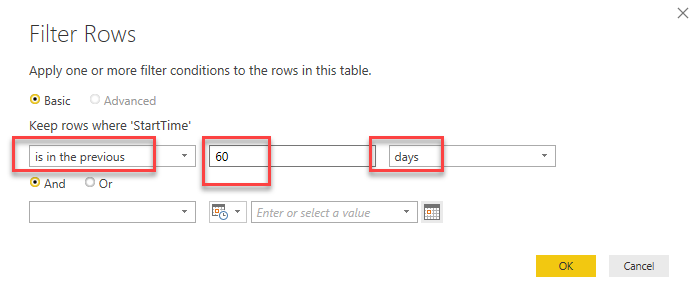
then apply the filter like so:
Imke Feldmann (The BIccountant)
If you liked my solution, please give it a thumbs up. And if I did answer your question, please mark this post as a solution. Thanks!
How to integrate M-code into your solution -- How to get your questions answered quickly -- How to provide sample data -- Check out more PBI- learning resources here -- Performance Tipps for M-queries
@ImkeF I need to PERMANENTLY DELETE old data, not just filtering them out from the view. Thanks!
Just to make sure my understanding is correct: You want to delete rows in the underlying csv files that you're importing with Power BI?
That's not possible with native Power BI. You'd have to use Python- or R-scripts (from Power Query) for that.
Imke Feldmann (The BIccountant)
If you liked my solution, please give it a thumbs up. And if I did answer your question, please mark this post as a solution. Thanks!
How to integrate M-code into your solution -- How to get your questions answered quickly -- How to provide sample data -- Check out more PBI- learning resources here -- Performance Tipps for M-queries
You can't really do that in DAX, you would want to use power query. @ImkeF should be able to help you.
Check out the November 2025 Power BI update to learn about new features.
Advance your Data & AI career with 50 days of live learning, contests, hands-on challenges, study groups & certifications and more!
| User | Count |
|---|---|
| 10 | |
| 10 | |
| 8 | |
| 6 | |
| 6 |
| User | Count |
|---|---|
| 25 | |
| 21 | |
| 19 | |
| 16 | |
| 10 |