Hello.
I am trying to build I-MR charts on the month level and am having difficultly getting the average & standard deviation of my "Moving Range" measure.
Here is a sample of the excel data I start with. The "Date" column is a calculated column created in Power BI after the data is loaded:
| Month | Year | metric_a | metric_b | Date |
| 1 | 2020 | | 5.5 | 1/1/2020 12:00:00 AM |
| 1 | 2020 | | 4.5 | 1/1/2020 12:00:00 AM |
| 1 | 2020 | 6.2 | | 1/1/2020 12:00:00 AM |
| 2 | 2020 | | 3.3 | 2/1/2020 12:00:00 AM |
| 2 | 2020 | | 6.7 | 2/1/2020 12:00:00 AM |
| 2 | 2020 | 5.4 | | 2/1/2020 12:00:00 AM |
| 3 | 2020 | | 2.2 | 3/1/2020 12:00:00 AM |
| 3 | 2020 | | 10.8 | 3/1/2020 12:00:00 AM |
| 3 | 2020 | 7.8 | | 3/1/2020 12:00:00 AM |
The measure I am using for the I-MR charts is a ratio between the two metrics. The DAX formulas I used to create the ratio measures are:
Sum_A = SUM(Sheet1[metric_a])
Sum_B = SUM(Sheet1[metric_b])
Ratio = DIVIDE([Sum_A], [Sum_B])
I used the PREVIOUSMONTH() function to calculate the ratio value from the previous month and then subtract the two measures to get Moving Range:
Ratio Last Month = CALCULATE('Measures Table'[Ratio], PREVIOUSMONTH('Date Table'[Date]))
Moving Range = ABS([Ratio] - [Ratio Last Month])
Viewing a table of the results everything looks accurate:
| Year | Month | Ratio | Ratio Last Month | Moving Range |
| 2020 | January | 62.00% | | 62.00% |
| 2020 | February | 54.00% | 62.00% | 8.00% |
| 2020 | March | 60.00% | 54.00% | 6.00% |
| 2020 | April | 51.90% | 60.00% | 8.10% |
To build the LCL and UCL lines for the I-MR charts I need the average and standard deviation of both "Ratio" and "Moving Range". I attempted to calculate these metrics with these measures:
Ratio Avg = AverageX(ALLSELECTED('Date Table'[Date]),[Ratio])
Ratio StdDev = STDEVX.P('Date Table',CALCULATE([Ratio]))
Moving Range Avg = AverageX(ALLSELECTED('Date Table'[Date]),[Moving Range])
Moving Range StdDev = STDEVX.P('Date Table',CALCULATE([Moving Range]))
I placed the average and standard deviation measures in a card. The average and standard deviation are correct for the Ratio measure but incorrect for the Moving Range measure:
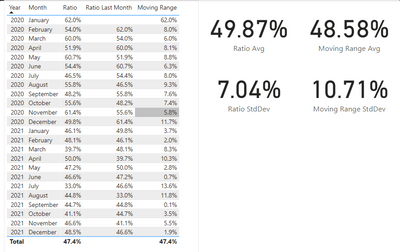
According to Excel the average Moving Range is 8.88% with a standard deviation of 11.62%. Any idea what I need to change to get the correct results for Moving Range? Any help is greatly appreciated, thank you!
Link to .pbix: https://drive.google.com/file/d/1CWtFiHCjNhANGD9XCwvyIo8dvaeerry-/view?usp=sharing


