cancel
Showing results for 
Search instead for 
Did you mean: 

Get Fabric Certified for FREE during AI Skills Fest. This week only. Secure your voucher now.

Reply
Anonymous
Not applicable

DATEDIFF between 2 dates in different tables

Hi this is my very first post and hoping someone can guide me in the right direction.

I'm trying to ascertain the DATEDIFF in minutes between 2 dates that are held in different tables.


My first table contains operating theatre sessions.  I've created a composite key with the date of the session, the operating theatre, and which surgeon is scheduled to use it.

CiaraD_2-1653479294707.png

My second table contains the patient-specific information for surgeries.  Again I created a composite key with the date of surgery, the operating theatre where the surgery was performed, and the surgeon who performed it.  I have also ascertained which patient per date, per operating room per surgeon was the first to be operated on. 


CiaraD_0-1653479223759.png


Just to note, I also have a 'link' table with the data for each dimension (operating room and surgeon)
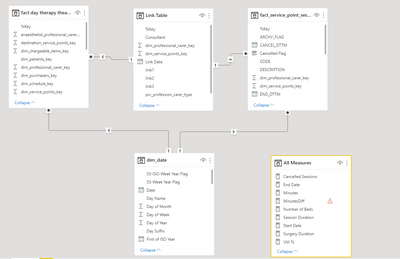
CiaraD_3-1653481775974.png


What I'm trying to measure is the number of minutes between the start of the session (START_DTTM from table 1) to the start of the first patient (Into Theatre DateTime from table 2) where the %Key matches.


After discovering various different functions, I thought I had a breakthrough with the below code but it doesn't work when trying to aggregate over a number of days/weeks obviously since I haven't defined that the 'fact_service_point_sessions'[%Key] needs to equal the 'fact day therapy theatre events'[%Key].


Minutes = CALCULATE(DATEDIFF(SELECTEDVALUE('fact_service_point_sessions'[START_DTTM]),SELECTEDVALUE('fact day therapy theatre events'[Earliest Date]),MINUTE), 'fact day therapy theatre events'[First Patient] = "First")
 
Open to any and all suggestions/advice.
 
Thanks if you got this far!
 
Ciara
1 ACCEPTED SOLUTION

@Anonymous 

Please use 


Minutes =
SUMX (
    CROSSJOIN (
        SUMMARIZE ( 'Link Table', dim_date[Date], dim_date[Year] ),
        SUMMARIZE (
            'Link Table',
            'Link Table'[dim_professional_carer_key],
            'Link Table'[dim_service_points_key]
        )
    ),
    CALCULATE (
        DATEDIFF (
            SELECTEDVALUE ( 'fact_service_point_sessions'[START_DTTM] ),
            SELECTEDVALUE ( 'fact day therapy theatre events'[Earliest Date] ),
            MINUTE
        ),
        'fact day therapy theatre events'[First Patient] = "First"
    )
)


View solution in original post

4 REPLIES 4
Anonymous
Not applicable

Hi Tamer


Thanks for responding.  


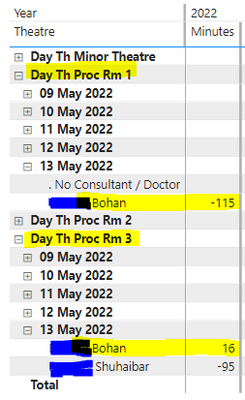
Below is an expanded matrix showing the measure I'm expecting for the example I gave above. 


CiaraD_2-1653487412375.png


But if I collapse any portion of the matrix it doesnt aggregate my measure.

CiaraD_5-1653487558010.png


@Anonymous 

Please use 


Minutes =
SUMX (
    CROSSJOIN (
        SUMMARIZE ( 'Link Table', dim_date[Date], dim_date[Year] ),
        SUMMARIZE (
            'Link Table',
            'Link Table'[dim_professional_carer_key],
            'Link Table'[dim_service_points_key]
        )
    ),
    CALCULATE (
        DATEDIFF (
            SELECTEDVALUE ( 'fact_service_point_sessions'[START_DTTM] ),
            SELECTEDVALUE ( 'fact day therapy theatre events'[Earliest Date] ),
            MINUTE
        ),
        'fact day therapy theatre events'[First Patient] = "First"
    )
)


Anonymous
Not applicable

Thank you so much for all your help Tamer.  I couldn't have done it without you.


tamerj1
Community Champion
Community Champion

Hi @Anonymous 

Can you please share a sample of the expected results?

Helpful resources

Announcements
May Power BI Update Carousel

Power BI Monthly Update - May 2026

Check out the May 2026 Power BI update to learn about new features.

Fabric SQL PBI Data Days

Data Days 2026 coming soon!

Sign up to receive a private message when registration opens and key events begin.

New to Fabric survey Carousel

New to Fabric Survey

If you have recently started exploring Fabric, we'd love to hear how it's going. Your feedback can help with product improvements.

Power BI DataViz World Championships carousel

Power BI DataViz World Championships - June 2026

A new Power BI DataViz World Championship is coming this June! Don't miss out on submitting your entry.