Join us at FabCon Vienna from September 15-18, 2025
The ultimate Fabric, Power BI, SQL, and AI community-led learning event. Save €200 with code FABCOMM.
Get registered- Power BI forums
- Get Help with Power BI
- Desktop
- Service
- Report Server
- Power Query
- Mobile Apps
- Developer
- DAX Commands and Tips
- Custom Visuals Development Discussion
- Health and Life Sciences
- Power BI Spanish forums
- Translated Spanish Desktop
- Training and Consulting
- Instructor Led Training
- Dashboard in a Day for Women, by Women
- Galleries
- Data Stories Gallery
- Themes Gallery
- Contests Gallery
- Quick Measures Gallery
- Notebook Gallery
- Translytical Task Flow Gallery
- TMDL Gallery
- R Script Showcase
- Webinars and Video Gallery
- Ideas
- Custom Visuals Ideas (read-only)
- Issues
- Issues
- Events
- Upcoming Events
Enhance your career with this limited time 50% discount on Fabric and Power BI exams. Ends September 15. Request your voucher.
- Power BI forums
- Forums
- Get Help with Power BI
- DAX Commands and Tips
- Re: DATEDIFF as DAX Measure
- Subscribe to RSS Feed
- Mark Topic as New
- Mark Topic as Read
- Float this Topic for Current User
- Bookmark
- Subscribe
- Printer Friendly Page

- Mark as New
- Bookmark
- Subscribe
- Mute
- Subscribe to RSS Feed
- Permalink
- Report Inappropriate Content
DATEDIFF as DAX Measure
Hello all,
I am trying to create a measure that calculates the difference between 2 time columns (hh:mm:ss format) and gives a result as a decimal. DATEDIFF works as a calculated column, but I cannot figure out how to translate to a DAX Measure. My report is saying there is too much space being taken up, so I want to change these columns to measures.
Please help!
Solved! Go to Solution.


- Mark as New
- Bookmark
- Subscribe
- Mute
- Subscribe to RSS Feed
- Permalink
- Report Inappropriate Content
You could try either of these measure expressions
TimeDiff = SUMX(Table, Table[TimeColumn1] - Table[TimeColumn2]
or
TimeDiff = SUMX(Table, DATEDIFF(Table[TimeColumn1], Table[TimeColumn2], MINUTE))
If you make a table visual with both time columns, you should see the difference when you add the measure. Or you could use the aggregate, maybe switching to AVERAGEX, MAXX, etc. depending on what you are looking for.
Also, there are probably more impactful ways to reduce the file size of your model.
If this works for you, please mark it as the solution. Kudos are appreciated too. Please let me know if not.
Regards,
Pat
Did I answer your question? Mark my post as a solution! Kudos are also appreciated!
To learn more about Power BI, follow me on Twitter or subscribe on YouTube.
@mahoneypa HoosierBI on YouTube


- Mark as New
- Bookmark
- Subscribe
- Mute
- Subscribe to RSS Feed
- Permalink
- Report Inappropriate Content
@Anonymous ,
[Date1] -[Date2] will give in that format.
If you get in in second, minute or hour refer this for the duration of your choice
- Mark as New
- Bookmark
- Subscribe
- Mute
- Subscribe to RSS Feed
- Permalink
- Report Inappropriate Content
The DAX measure does not give me the option to call the entire column, so I cannot use [Date 1] - [Date 2]. In this case I would need a function that allows me to subtract 2 columns that are in the date format.
- Mark as New
- Bookmark
- Subscribe
- Mute
- Subscribe to RSS Feed
- Permalink
- Report Inappropriate Content
@Anonymous , in Measure you need to
measure = max([Date1]) -min([Date2])
Take care row context while using. refer this blog how summarize and valuea has been used
- Mark as New
- Bookmark
- Subscribe
- Mute
- Subscribe to RSS Feed
- Permalink
- Report Inappropriate Content
Hello, hoping you can read my last reply and provide some assistance please. I have a hard deadline for this project and I'm really trying to deliver it. Thank you!
- Mark as New
- Bookmark
- Subscribe
- Mute
- Subscribe to RSS Feed
- Permalink
- Report Inappropriate Content
You could try either of these measure expressions
TimeDiff = SUMX(Table, Table[TimeColumn1] - Table[TimeColumn2]
or
TimeDiff = SUMX(Table, DATEDIFF(Table[TimeColumn1], Table[TimeColumn2], MINUTE))
If you make a table visual with both time columns, you should see the difference when you add the measure. Or you could use the aggregate, maybe switching to AVERAGEX, MAXX, etc. depending on what you are looking for.
Also, there are probably more impactful ways to reduce the file size of your model.
If this works for you, please mark it as the solution. Kudos are appreciated too. Please let me know if not.
Regards,
Pat
Did I answer your question? Mark my post as a solution! Kudos are also appreciated!
To learn more about Power BI, follow me on Twitter or subscribe on YouTube.
@mahoneypa HoosierBI on YouTube
- Mark as New
- Bookmark
- Subscribe
- Mute
- Subscribe to RSS Feed
- Permalink
- Report Inappropriate Content
Second measure worked using MAXX. Thank you very much!!!
Additionally, could you tell me what are the best ways to substantially reduce file size?
- Mark as New
- Bookmark
- Subscribe
- Mute
- Subscribe to RSS Feed
- Permalink
- Report Inappropriate Content
I tried that measure and when I put it in a table it only gives one value. I am trying to replicate the following column as a DAX measure:
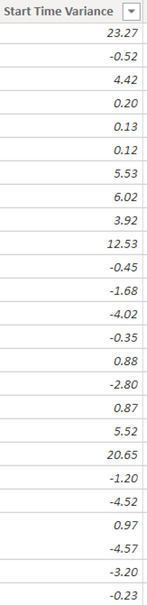
This was calculated using the following calculation:
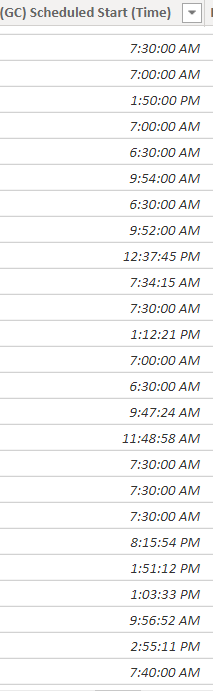
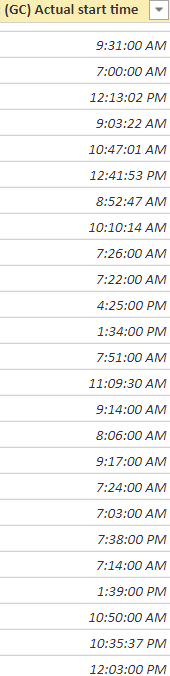
Helpful resources

Power BI Monthly Update - August 2025
Check out the August 2025 Power BI update to learn about new features.

Fabric Community Update - August 2025
Find out what's new and trending in the Fabric community.

| User | Count |
|---|---|
| 15 | |
| 12 | |
| 8 | |
| 7 | |
| 7 |


| User | Count |
|---|---|
| 24 | |
| 21 | |
| 12 | |
| 10 | |
| 7 |


