Don't miss your chance to take the Fabric Data Engineer (DP-700) exam on us!
Learn moreWe've captured the moments from FabCon & SQLCon that everyone is talking about, and we are bringing them to the community, live and on-demand. Starts on April 14th. Register now
Hi,
I'm trying to get a specific total value, but I'm not sure how can I achieve it.
So I've got two variables "Densidade" and "FX Quimicos". The way my deviation formula works, I can get the total for one or the other, depending on which is being filtered on the slicer. The thing is I want the total also when both are being selected, but the total needs to be the sum of the individual values of each variable. Example below: File: https://we.tl/t-i40oiGDkRJ
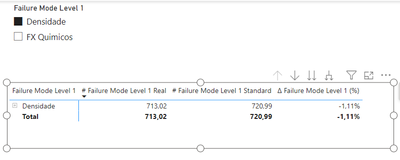
My total for "Densidade" deviation is -1,11%:
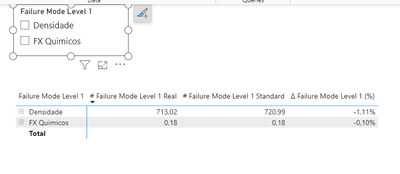
My total for "FX Quimicos" deviation is -0,11%:
My total value of both variables should be -1,11% + (- 0,10%) = -1,21%
I have not been able to get that total of the both variables. Tried summarize but still not working.
Could you please help me in this?
Thank you
Best regards,
André
Solved! Go to Solution.
Create Individual Deviation Measures:
Create a New Measure for Total:
Total Deviation = [Densidade Deviation] + [FX Quimicos Deviation]
Display Total Deviation in Visuals:
Handle Slicer Interaction:
Here's an example of how you might adjust your measure to handle slicer interactions:
Total Deviation =
CALCULATE(
[Densidade Deviation] + [FX Quimicos Deviation],
ALL('YourTableName'[YourSlicerField])
)
Replace 'YourTableName' and 'YourSlicerField' with the appropriate table and field names.
Remember that DAX measures should reflect the logic you want in your visualizations. Adjust the calculations based on your specific data model and requirements.
If you encounter specific issues or have more details to provide, feel free to share the relevant parts of your DAX code or describe the issue, and I'll do my best to assist you.
Hi @afbraga66 ,
Did the above suggestions help with your scenario? if that is the case, you can consider Kudo or Accept the helpful suggestions to help others who faced similar requirements.
If these also don't help, please share more detailed information and description to help us clarify your scenario to test.
How to Get Your Question Answered Quickly
Regards,
Xiaoxin Sheng
Hey, not sure why is this happening but my post was marked as spam.
Here is the original link: https://community.fabric.microsoft.com/t5/DAX-Commands-and-Tips/Custom-total-value-for-measure/m-p/3...
If someone could help I would appreciate.
Thank you.
Best regards,
André
Create Individual Deviation Measures:
Create a New Measure for Total:
Total Deviation = [Densidade Deviation] + [FX Quimicos Deviation]
Display Total Deviation in Visuals:
Handle Slicer Interaction:
Here's an example of how you might adjust your measure to handle slicer interactions:
Total Deviation =
CALCULATE(
[Densidade Deviation] + [FX Quimicos Deviation],
ALL('YourTableName'[YourSlicerField])
)
Replace 'YourTableName' and 'YourSlicerField' with the appropriate table and field names.
Remember that DAX measures should reflect the logic you want in your visualizations. Adjust the calculations based on your specific data model and requirements.
If you encounter specific issues or have more details to provide, feel free to share the relevant parts of your DAX code or describe the issue, and I'll do my best to assist you.
If you have recently started exploring Fabric, we'd love to hear how it's going. Your feedback can help with product improvements.
A new Power BI DataViz World Championship is coming this June! Don't miss out on submitting your entry.
Share feedback directly with Fabric product managers, participate in targeted research studies and influence the Fabric roadmap.
| User | Count |
|---|---|
| 9 | |
| 6 | |
| 3 | |
| 2 | |
| 2 |
| User | Count |
|---|---|
| 22 | |
| 14 | |
| 10 | |
| 6 | |
| 5 |