Forum Discussion
Anonymous
3 years agoNot applicable
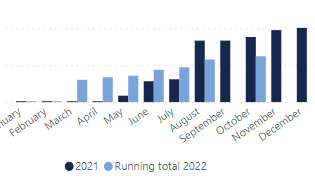
Cumulative total, missing month
Hi
I have a cumulative total bar chart comparing proposals sent from 2021 to 2022. In September there were no proposals sent. How do you carry accross the same value for August so that September is not left blank?
Running total 2022 = CALCULATE([Gross Value for 2022 running total in Month], FILTER(ALL('All Deals'[Proposal Sent Date]), 'All Deals'[Proposal Sent Date]<=MAX('All Deals'[Proposal Sent Date])))
Thank you
Hi Anonymous
I don't think this can be achieved without the use of a Date Table. Using a Date Table you can slice by [Month Name]Running total 2022 new = COALESCE ( [Running total 2022], CALCULATE ( [Running total 2022], ALL ( 'Date'[Month Name] ), 'Date'[YearMonth Rank] = MAX ( 'Date'[YearMonth Rank] ) - 1 ) )
2 Replies
- tamerj1
Community Champion
Hi Anonymous
I don't think this can be achieved without the use of a Date Table. Using a Date Table you can slice by [Month Name]Running total 2022 new = COALESCE ( [Running total 2022], CALCULATE ( [Running total 2022], ALL ( 'Date'[Month Name] ), 'Date'[YearMonth Rank] = MAX ( 'Date'[YearMonth Rank] ) - 1 ) )- tamerj1
Community Champion
Anonymous
You can use the [Month Number] column but that won't work in case the blank month is January and you want to return December of the previous year.