Join us at FabCon Atlanta from March 16 - 20, 2026, for the ultimate Fabric, Power BI, AI and SQL community-led event. Save $200 with code FABCOMM.
Register now!Get Fabric Certified for FREE during Fabric Data Days. Don't miss your chance! Request now
Hi,
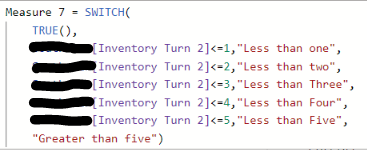
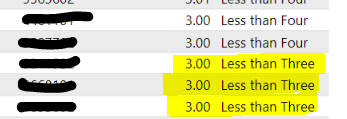
This is a two parter question. I have a measure calculating my how often my inventory is turning. I want however to be able to group these into categories "Less than one", "greater than two", etc. Right now it doesnt seem to be grouping some of these correctly and i cant figure out why. From there i want to create a percentage of each of these categories but its not recognizing these groups unless i have another field in the table which defeats the purpose of trying to group these if i cant see how much inventory falls into each. Help!! 😞
Solved! Go to Solution.
@Bryanna , Try Dynamic Segmentation
Dynamic Segmentation Bucketing Binning
https://community.powerbi.com/t5/Quick-Measures-Gallery/Dynamic-Segmentation-Bucketing-Binning/m-p/1...
Dynamic Segmentation, Bucketing, or Binning: https://youtu.be/CuczXPj0N-k
Dynamic segmentation -Measure to Dimension conversion: https://youtu.be/gzY40NWJpWQ
Thanks! the Dynamic Segmentation, Bucketing, or Binning: Youtube video helped perfectly!
@Bryanna , Try Dynamic Segmentation
Dynamic Segmentation Bucketing Binning
https://community.powerbi.com/t5/Quick-Measures-Gallery/Dynamic-Segmentation-Bucketing-Binning/m-p/1...
Dynamic Segmentation, Bucketing, or Binning: https://youtu.be/CuczXPj0N-k
Dynamic segmentation -Measure to Dimension conversion: https://youtu.be/gzY40NWJpWQ
Check out the November 2025 Power BI update to learn about new features.
Advance your Data & AI career with 50 days of live learning, contests, hands-on challenges, study groups & certifications and more!
| User | Count |
|---|---|
| 11 | |
| 9 | |
| 9 | |
| 6 | |
| 5 |
| User | Count |
|---|---|
| 27 | |
| 22 | |
| 19 | |
| 17 | |
| 11 |