Join us at FabCon Atlanta from March 16 - 20, 2026, for the ultimate Fabric, Power BI, AI and SQL community-led event. Save $200 with code FABCOMM.
Register now!Get Fabric Certified for FREE during Fabric Data Days. Don't miss your chance! Request now
Hi,
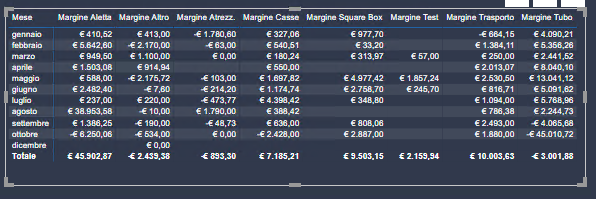
I need to create a table similar to the following:
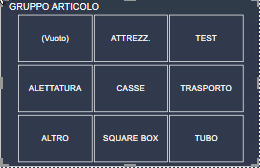
with month as row and different measures as column or even better the measures as row. The reason is that I want to use the measures as a filter and see their values in a single chart.
Each measure is obtained by subtracting two addittional measures that combine multiple tables:
for example, the Tubes Margin is:
TUBE REVENUES =
VAR Tube = CALCULATE (SUM ('*PRICE'[€ TUBES]))
Solved! Go to Solution.
@Luca2020 Hi,
You can create a calculation group using tabular editor in this case.
And then create calculation items for each measure and deploy the model so that you can use measures as columns or rows.
(About Calculation Group, you can refer to this article)
Mark this post as solution if this helps, thanks!
@Luca2020 Hi,
You can create a calculation group using tabular editor in this case.
And then create calculation items for each measure and deploy the model so that you can use measures as columns or rows.
(About Calculation Group, you can refer to this article)
Mark this post as solution if this helps, thanks!
Check out the November 2025 Power BI update to learn about new features.
Advance your Data & AI career with 50 days of live learning, contests, hands-on challenges, study groups & certifications and more!
| User | Count |
|---|---|
| 12 | |
| 9 | |
| 8 | |
| 5 | |
| 3 |
| User | Count |
|---|---|
| 28 | |
| 21 | |
| 20 | |
| 18 | |
| 12 |