Forum Discussion
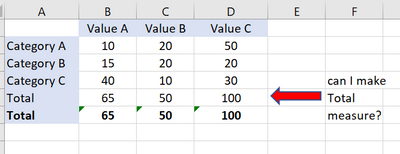
Create Measure or calculated Column for tabular Total
- 4 years ago
What you're asking for is not so easy to create. Alberto Ferrari has a vid on YT that deals with such issues. Basically, you have to create a different table with this row 'Category Total' added, connect this table to other table(s) and create a measure that will do the right thing. It's not basic stuff. If I find this video, I'll come back and give you a link. But you could try to locate it yourself on YT. Just try to search for phrases like "add total row", "add others"...
Here's something to get you started: Filtering the top products alongside the other products in Power BI - SQLBI
[Total Across Visible Categories] =
CALCULATE(
[Your Measure],
ALLSELECTED( T[Category] )
)Thanks. That is interesting. But not what I am looking for.
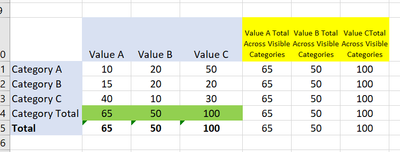
Using the new measure you have lets me created the following yellow columns.
But I would like to add another category value that is the "Category Total" green row.
- daXtreme4 years ago
Solution Sage
What you're asking for is not so easy to create. Alberto Ferrari has a vid on YT that deals with such issues. Basically, you have to create a different table with this row 'Category Total' added, connect this table to other table(s) and create a measure that will do the right thing. It's not basic stuff. If I find this video, I'll come back and give you a link. But you could try to locate it yourself on YT. Just try to search for phrases like "add total row", "add others"...
Here's something to get you started: Filtering the top products alongside the other products in Power BI - SQLBI
- 009co4 years ago
Helper IV
Ok yes this is not a DAX solution but need to do it at the query level.
Something like:
1. Make another query that aggregate category values as new category column value named "Category Total".
2. Append new query to original query. Query results will then have rows for each category, and a new row for category total.
Have to ensure that the new category "category total" is only used where relevant.