Hey all!
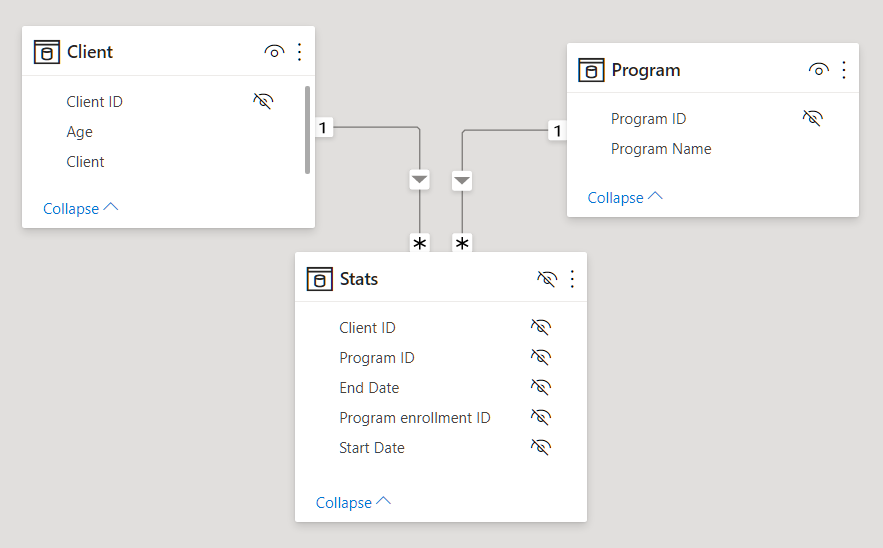
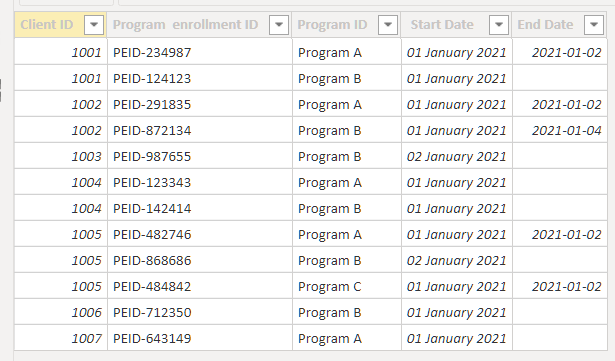
I'm still in learning DAX and I'm trying to calculate the number of people who are older than 20, currently enrolled in one program with no concurrent open enrollments in any other program using two tables. Current enrollment is determined by the End Date in Table 2 being blank, and not current enrollment is determined by having an end date or not having a row for that program type. Any help is appreciated!
Here's an example of how the data is set up:
Table A: Client demographics
| client ID | Age |
| 1001 | 25 |
| 1002 | 25 |
| 1003 | 25 |
| 1004 | 23 |
| 1005 | 23 |
| 1006 | 17 |
| 1007 | 23 |
Table A: Program Enrollments
| Client ID | Program enrollment ID | Program Name | Start Date | End Date |
| 1001 | PEID-234987 | Program A | 1/1/2021 | 2/1/2021 |
| 1001 | PEID-124123 | Program B | 1/1/2021 | |
| 1002 | PEID-291835 | Program A | 1/1/2021 | 2/1/2021 |
| 1002 | PEID-872134 | Program B | 1/1/2021 | 4/1/2021 |
| 1003 | PEID-987655 | Program B | 2/1/2021 | |
| 1004 | PEID-123343 | Program A | 1/1/2021 | |
| 1004 | PEID-142414 | Program B | 1/1/2021 | |
| 1005 | PEID-482746 | Program A | 1/1/2021 | 2/1/2021 |
1005 | PEID-868686 | Program B | 2/1/2021 | |
1005 | PEID-484842 | Program C | 1/1/2021 | 2/1/2021 |
1006 | PEID-712350 | Program B | 1/1/2021 | |
1007 | PEID-643149 | Program A | 1/1/2021 | |
In this example i'd want to know how many clients older than 13 are currently in Program B, and not enrolled in Program A or C.
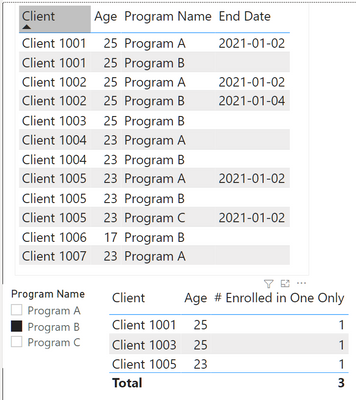
For this example I'd hope the count to be 3 (client 1001, Client 1003, Client 1005) and exclude
- Client 2 (no open Program B enrollment)
- Client 4 (has an open Program A enrollment)
- Client 6 (Age below 20)
- Client 7 (does not have a Program B enrollment)
Any and all help would be appreciated! right now I'm just trying to calculate this count and I'm not worried about how to visualize it just yet.