Hi,
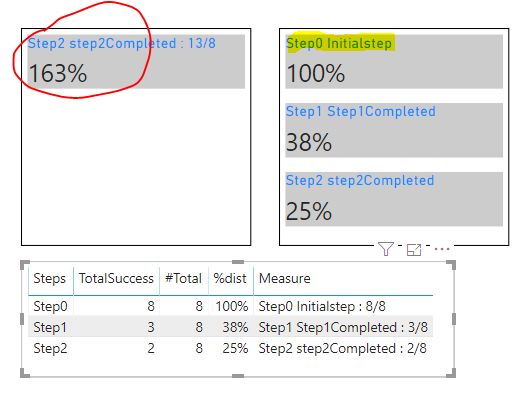
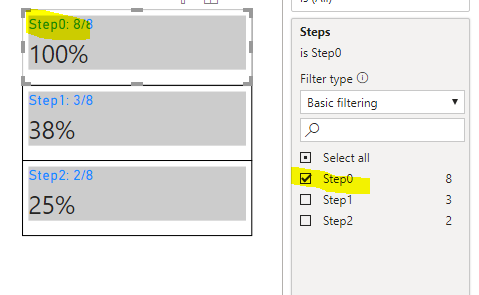
I have a requirement to show the title of a multi row card (highligthed in the snip) as combination of a Text, column and a Measure.
I am able to get the values correctly for each individual item but if the text, column value and the measure value are concatnated using "&", the value of measure is blank.
Measure Details:
TotalSuccess = CALCULATE(SUM(PageAttempts[Attempts]),FILTER(PageAttempts,PageAttempts[Success/failed]="Success"),ALLSELECTED(PageAttempts[Date]))
#Total = sumx(ALLEXCEPT(PageAttempts,PageAttempts[Stepname],PageAttempts[Steps],PageAttempts[Success/failed],PageAttempts[Column2],PageAttempts[Date]),[Total])
%dist = CALCULATE(DIVIDE([TotalSuccess],Sumx(ALL(PageAttempts[Steps],PageAttempts[Stepname],PageAttempts[Success/failed],PageAttempts[Column2]),[#Total])))
Step+Stepname = PageAttempts[Steps] & " " & PageAttempts[Stepname] & " "
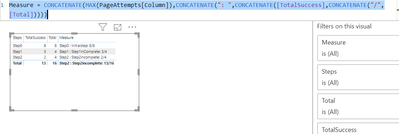
Show = PageAttempts[Step+Stepname] & ": " & [TotalSuccess] & " / " & [Total]
Show measure is not working as the output has incorrect value of TotalSuccess & #Total measures.
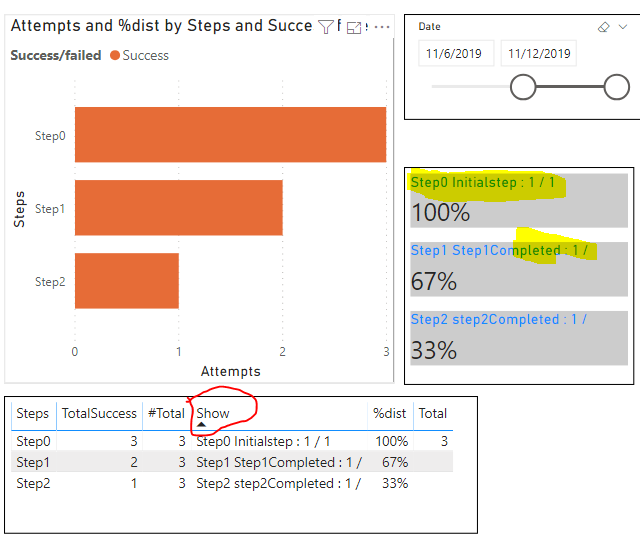 Show (marked in Red) is not working
| Steps | Stepname | Attempts | Success/failed | Country | Date |
| Step0 | Initialstep | 1 | Success | US | 11/1/2019 0:00 |
| Step1 | Step1Completed | 1 | Success | US | 11/1/2019 0:00 |
| Step0 | Initialstep | 1 | Success | US | 11/2/2019 0:00 |
| Step1 | Step1inComplete | 1 | Failed | US | 11/2/2019 0:00 |
| Step0 | Initialstep | 1 | Success | US | 11/3/2019 0:00 |
| Step2 | step2Completed | 1 | Success | US | 11/3/2019 0:00 |
| Step0 | Initialstep | 1 | Success | US | 11/4/2019 0:00 |
| Step2 | Step2Error | 1 | Error | US | 11/4/2019 0:00 |
| Step0 | Initialstep | 1 | Success | US | 11/5/2019 0:00 |
| Step2 | Step2incomplete | 1 | Failed | US | 11/5/2019 0:00 |
| Step0 | Initialstep | 1 | Success | IN | 11/10/2019 0:00 |
| Step1 | Step1Completed | 1 | Success | IN | 11/10/2019 0:00 |
| Step0 | Initialstep | 1 | Success | IN | 11/11/2019 0:00 |
| Step1 | Step1Completed | 1 | Success | IN | 11/11/2019 0:00 |
| Step0 | Initialstep | 1 | Success | IN | 11/12/2019 0:00 |
| Step2 | step2Completed | 1 | Success | IN | 11/12/2019 0:00 |
Table:1 Sample data
Need your help to fix this issue.
Let me know if any additional infomation is required.
Thanks in advance,
Regards,
Prabir