FabCon is coming to Atlanta
Join us at FabCon Atlanta from March 16 - 20, 2026, for the ultimate Fabric, Power BI, AI and SQL community-led event. Save $200 with code FABCOMM.
Register now!- Power BI forums
- Get Help with Power BI
- Desktop
- Service
- Report Server
- Power Query
- Mobile Apps
- Developer
- DAX Commands and Tips
- Custom Visuals Development Discussion
- Health and Life Sciences
- Power BI Spanish forums
- Translated Spanish Desktop
- Training and Consulting
- Instructor Led Training
- Dashboard in a Day for Women, by Women
- Galleries
- Data Stories Gallery
- Themes Gallery
- Contests Gallery
- QuickViz Gallery
- Quick Measures Gallery
- Visual Calculations Gallery
- Notebook Gallery
- Translytical Task Flow Gallery
- TMDL Gallery
- R Script Showcase
- Webinars and Video Gallery
- Ideas
- Custom Visuals Ideas (read-only)
- Issues
- Issues
- Events
- Upcoming Events
View all the Fabric Data Days sessions on demand. View schedule
- Power BI forums
- Forums
- Get Help with Power BI
- DAX Commands and Tips
- Re: Certain UNICODE characters break measure resul...
- Subscribe to RSS Feed
- Mark Topic as New
- Mark Topic as Read
- Float this Topic for Current User
- Bookmark
- Subscribe
- Printer Friendly Page

- Mark as New
- Bookmark
- Subscribe
- Mute
- Subscribe to RSS Feed
- Permalink
- Report Inappropriate Content
Certain UNICODE characters break measure results. (in a weird way, too)
Hey everyone, I have this simple piece of code that displays a number of star symbols according to the score for an entity (it's companies in my case).
TEST STARS =
VAR score = INT([Company Score]*5)
VAR stars = REPT(UNICHAR(11088), score)
RETURN stars
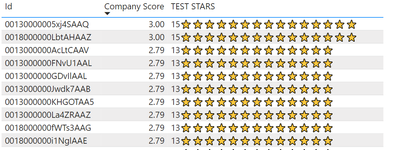
I have multiplied by 5 to make the issue totally clear: so, for a score of 3, I would expect to see INT(3*5) = 15 stars, right?
Well, power bi says "WRONG":

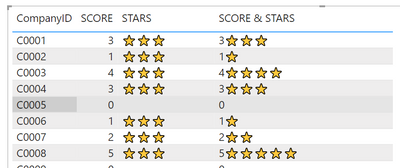
Now, watch this, the weird part: if I add the score in the measure's return value, i.e. changing the last line to :
RETURN score & stars
then I get the correct number of stars:
I also get the correct number of stars if I use a different star symbol, for example UNICHAR(9733).
I have spent hours debugging the wrong number of stars shown, before I realized the cause - and now, I want to get to the bottom of this.
Any ideas why this is happening? Should it be reported as a bug?
Thank you all
UPDATE1: It seems unichars up to 11034 work fine; from 11035 and onwards, the weird behaviour is happening.
UPDATE2: The cause is the existence of Calculation Groups in the model, even though not used in the offending visual.
Solved! Go to Solution.


- Mark as New
- Bookmark
- Subscribe
- Mute
- Subscribe to RSS Feed
- Permalink
- Report Inappropriate Content
@nchr thanks for uploading the file 🙂
(Super User status is needed to be able to attach directly to a post.)
Thanks for your additional observations, which helped investigate this. This is very odd behaviour!
At this stage I can say:
- This behaviour does appear to a bug.
- I can't see any valid explanation for the behaviour, and I can't explain it in terms of the DAX engine. Hopefully someone from the Power BI team can look into this and explain.
- The behaviour occurs in Power BI visuals (or equivalent DAX queries) but not in a PivotTable connected to the Power BI dataset using Analyze in Excel. This suggests that it is a DAX-specific issue, since Excel generates MDX queries. Presumably any other client tools using MDX would not exhibit the bug.
- The conditions required to see this behaviour (from my testing) are:
- At least one calculation group is present in the model.
- The measure being visualized returns a text value by repeating a single character multiple times.
This can be done with the REPT function or CONCATENATEX/GENERATESERIES. - More than one "row" of results is returned in the visual.
If just one CompanyID is filtered for example, the STARS measure returns the correct result. - Only certain characters result in this behaviour.
In my testing, characters in the range 11044-11512 mostly cause the bug, with some exceptions (e.g. 11400 & 11480).
Characters outside the range 11044-11512 seem fine
- Workaround:
The only method I can get working is to include an additional "invisible" character in the repeated string, such as UNICODE(8203). This is fine from a visual perspective, but still unsatisfying in that we have to add "redundant" characters.
STARS fix =
VAR score =
    INT( [SCORE] )
VAR stars =
    REPT( UNICHAR( 11088 ) & UNICHAR( 8203 ), score )
RETURN
    stars
Feel free to log this as a bug. I plan to do the same through formal/informal channels.
I'd be interested to learn if you find any other workarounds or explanations yourself.
Regards,
- Mark as New
- Bookmark
- Subscribe
- Mute
- Subscribe to RSS Feed
- Permalink
- Report Inappropriate Content
Update: I have posted this to the Issues forum:
- Mark as New
- Bookmark
- Subscribe
- Mute
- Subscribe to RSS Feed
- Permalink
- Report Inappropriate Content
Hey @nchr
I have tried to reproduce the issue at my end with similar Compay Score and TEST STARS measures, but I can't reproduce it I'm afraid.
I get the correct number of stars whether using UNICHAR 11088 or 9733.
Do you have a PBIX you could share that demonstrates the issue (sanitised if necessary)?
Regards


- Mark as New
- Bookmark
- Subscribe
- Mute
- Subscribe to RSS Feed
- Permalink
- Report Inappropriate Content
I am having a similar issue.
I have a simple measure:
- Mark as New
- Bookmark
- Subscribe
- Mute
- Subscribe to RSS Feed
- Permalink
- Report Inappropriate Content
@OwenAuger thank you for looking into this, it was driving me crazy!
As I was cleaning the model to send it here, I found out the cause, but not why it happens: it is the Calculation Group.
Although the calculation group is not used at all in the visual, it's presence in the model causes this weird behaviour. When I deleted the calc group, the star measure worked as expected.
Check it out yourself with the attached model, if you explain that weird behaviour I will find peace of mind 😉
Well, I could not find a way to attach the file here, so here is a WeTransfer link:
https://we.tl/t-lvEn7V60bI
- Mark as New
- Bookmark
- Subscribe
- Mute
- Subscribe to RSS Feed
- Permalink
- Report Inappropriate Content
@nchr thanks for uploading the file 🙂
(Super User status is needed to be able to attach directly to a post.)
Thanks for your additional observations, which helped investigate this. This is very odd behaviour!
At this stage I can say:
- This behaviour does appear to a bug.
- I can't see any valid explanation for the behaviour, and I can't explain it in terms of the DAX engine. Hopefully someone from the Power BI team can look into this and explain.
- The behaviour occurs in Power BI visuals (or equivalent DAX queries) but not in a PivotTable connected to the Power BI dataset using Analyze in Excel. This suggests that it is a DAX-specific issue, since Excel generates MDX queries. Presumably any other client tools using MDX would not exhibit the bug.
- The conditions required to see this behaviour (from my testing) are:
- At least one calculation group is present in the model.
- The measure being visualized returns a text value by repeating a single character multiple times.
This can be done with the REPT function or CONCATENATEX/GENERATESERIES. - More than one "row" of results is returned in the visual.
If just one CompanyID is filtered for example, the STARS measure returns the correct result. - Only certain characters result in this behaviour.
In my testing, characters in the range 11044-11512 mostly cause the bug, with some exceptions (e.g. 11400 & 11480).
Characters outside the range 11044-11512 seem fine
- Workaround:
The only method I can get working is to include an additional "invisible" character in the repeated string, such as UNICODE(8203). This is fine from a visual perspective, but still unsatisfying in that we have to add "redundant" characters.
STARS fix =
VAR score =
    INT( [SCORE] )
VAR stars =
    REPT( UNICHAR( 11088 ) & UNICHAR( 8203 ), score )
RETURN
    stars
Feel free to log this as a bug. I plan to do the same through formal/informal channels.
I'd be interested to learn if you find any other workarounds or explanations yourself.
Regards,

Helpful resources

Power BI Monthly Update - November 2025
Check out the November 2025 Power BI update to learn about new features.

Fabric Data Days
Advance your Data & AI career with 50 days of live learning, contests, hands-on challenges, study groups & certifications and more!

FabCon Atlanta 2026
Join us at FabCon Atlanta, March 16-20, for the ultimate Fabric, Power BI, AI and SQL community-led event. Save $200 with code FABCOMM.

| User | Count |
|---|---|
| 13 | |
| 9 | |
| 9 | |
| 5 | |
| 4 |


| User | Count |
|---|---|
| 28 | |
| 20 | |
| 20 | |
| 19 | |
| 12 |


