Join us at FabCon Atlanta from March 16 - 20, 2026, for the ultimate Fabric, Power BI, AI and SQL community-led event. Save $200 with code FABCOMM.
Register now!View all the Fabric Data Days sessions on demand. View schedule
Hi all,
I have projects with different start date and projects investment takes for each 3 years and I need a Power BI measure that calculate the investment per year. I have only one table.
Thanks in advance for answer.
Solved! Go to Solution.
Hello @Amma17,
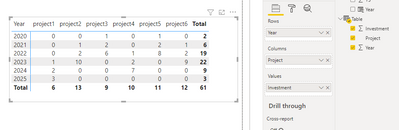
Please consider the following solution consisting of 2 steps:
1) You transform your initial table into the new one with the following [DAX] code.
2) You add a matrix visual, set it up and enjoy the result.
For convenience, here is the [DAX] code in plain text:
Table = ADDCOLUMNS (
( GENERATE ( SELECTCOLUMNS ( GENERATESERIES ( MIN ( data[Year] ), MAX ( data[Year] ) + 2 ), "Year", [Value] ),
VALUES ( data[Project] ) ) ),
"Investment",
VAR StartYear = YEAR ( LOOKUPVALUE ( data[Date], data[Project], [Project] ) )
RETURN SWITCH ( TRUE (),
[Year] = StartYear, LOOKUPVALUE ( data[Y1], data[Project], [Project] ),
[Year] = StartYear + 1, LOOKUPVALUE ( data[Y2], data[Project], [Project] ),
[Year] = StartYear + 2, LOOKUPVALUE ( data[Y3], data[Project], [Project] ),
0 )
) Best Regards,
Alexander
Solve it, I created a new table that contain years and I created a relationship one to one by year, so problem was solved.
Thanks for your response.
I have another question:
How can I create another table with Investment, but split between investment proposal ( created with :
T_N = ADDCOLUMNS (
Thanks in advance
Solve it, I created a new table that contain years and I created a relationship one to one by year, so problem was solved.
Hello @Amma17,
Please consider the following solution consisting of 2 steps:
1) You transform your initial table into the new one with the following [DAX] code.
2) You add a matrix visual, set it up and enjoy the result.
For convenience, here is the [DAX] code in plain text:
Table = ADDCOLUMNS (
( GENERATE ( SELECTCOLUMNS ( GENERATESERIES ( MIN ( data[Year] ), MAX ( data[Year] ) + 2 ), "Year", [Value] ),
VALUES ( data[Project] ) ) ),
"Investment",
VAR StartYear = YEAR ( LOOKUPVALUE ( data[Date], data[Project], [Project] ) )
RETURN SWITCH ( TRUE (),
[Year] = StartYear, LOOKUPVALUE ( data[Y1], data[Project], [Project] ),
[Year] = StartYear + 1, LOOKUPVALUE ( data[Y2], data[Project], [Project] ),
[Year] = StartYear + 2, LOOKUPVALUE ( data[Y3], data[Project], [Project] ),
0 )
) Best Regards,
Alexander
Check out the November 2025 Power BI update to learn about new features.
Advance your Data & AI career with 50 days of live learning, contests, hands-on challenges, study groups & certifications and more!
| User | Count |
|---|---|
| 14 | |
| 11 | |
| 9 | |
| 5 | |
| 4 |
| User | Count |
|---|---|
| 28 | |
| 20 | |
| 19 | |
| 18 | |
| 12 |