FabCon is coming to Atlanta
Join us at FabCon Atlanta from March 16 - 20, 2026, for the ultimate Fabric, Power BI, AI and SQL community-led event. Save $200 with code FABCOMM.
Register now!- Power BI forums
- Get Help with Power BI
- Desktop
- Service
- Report Server
- Power Query
- Mobile Apps
- Developer
- DAX Commands and Tips
- Custom Visuals Development Discussion
- Health and Life Sciences
- Power BI Spanish forums
- Translated Spanish Desktop
- Training and Consulting
- Instructor Led Training
- Dashboard in a Day for Women, by Women
- Galleries
- Data Stories Gallery
- Themes Gallery
- Contests Gallery
- Quick Measures Gallery
- Notebook Gallery
- Translytical Task Flow Gallery
- TMDL Gallery
- R Script Showcase
- Webinars and Video Gallery
- Ideas
- Custom Visuals Ideas (read-only)
- Issues
- Issues
- Events
- Upcoming Events
To celebrate FabCon Vienna, we are offering 50% off select exams. Ends October 3rd. Request your discount now.
- Power BI forums
- Forums
- Get Help with Power BI
- DAX Commands and Tips
- Calculate amount based on substring, show value on...
- Subscribe to RSS Feed
- Mark Topic as New
- Mark Topic as Read
- Float this Topic for Current User
- Bookmark
- Subscribe
- Printer Friendly Page

- Mark as New
- Bookmark
- Subscribe
- Mute
- Subscribe to RSS Feed
- Permalink
- Report Inappropriate Content
Calculate amount based on substring, show value on matching row (in a measure)
Hi,
I am trying to figure out if there is any way to get the row values from one "Transaction Number" to a another "Transaction Number" in the same column.
For example, I have a transaction number that have som form of amount. Sometimes, there are transactions that have the identical number but start with a "C". The C stands for "Correction" and I would like to get the values from the ones that start with "C" and show the results in a measure but on the row with the corresponding number without a letter. Is this possible to do as measure?
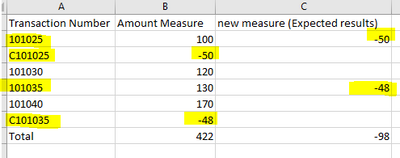
Thank you 🙂
Solved! Go to Solution.


- Mark as New
- Bookmark
- Subscribe
- Mute
- Subscribe to RSS Feed
- Permalink
- Report Inappropriate Content
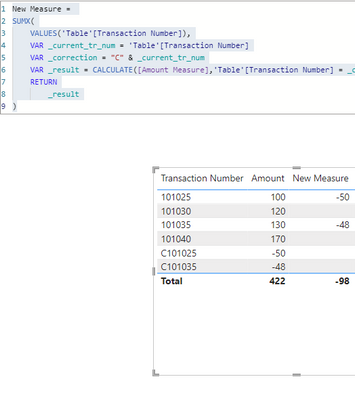
New Measure =
SUMX(
    VALUES('Table'[Transaction Number]),
    VAR _current_tr_num = 'Table'[Transaction Number]
    VAR _correction = "C" & _current_tr_num
    VAR _result = CALCULATE([Amount Measure],'Table'[Transaction Number] = _correction)
    RETURN
        _result
)

Showcase Report – Contoso By SpartaBI




- Mark as New
- Bookmark
- Subscribe
- Mute
- Subscribe to RSS Feed
- Permalink
- Report Inappropriate Content
New Measure =
SUMX(
    VALUES('Table'[Transaction Number]),
    VAR _current_tr_num = 'Table'[Transaction Number]
    VAR _correction = "C" & _current_tr_num
    VAR _result = CALCULATE([Amount Measure],'Table'[Transaction Number] = _correction)
    RETURN
        _result
)
Showcase Report – Contoso By SpartaBI
- Mark as New
- Bookmark
- Subscribe
- Mute
- Subscribe to RSS Feed
- Permalink
- Report Inappropriate Content
Thank you both for the quick replies. Unfortunately, I can’t get any of the codes to work since I misread my own data. The numbers are not identical, but the first 0 is replaced with a "C" e.g.
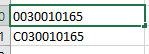
For your code @SpartaBI , I tried to alter the code like this (for the second variable):
"C" & LEFT(_current_tr_num,LEN(_current_tr_num)-1) .. But I might be getting the logic wrong.
And for your code @tamerj1 I couldn’t get "selectedvalue" to work (it was greyed out and not found by intellicense) so I replaced it with "hasonevalue", but the code is returning blanks.
I apologize in advance if the solution is simple. but I am a beginner in DAX.
- Mark as New
- Bookmark
- Subscribe
- Mute
- Subscribe to RSS Feed
- Permalink
- Report Inappropriate Content
- Mark as New
- Bookmark
- Subscribe
- Mute
- Subscribe to RSS Feed
- Permalink
- Report Inappropriate Content
hahaha it's amazing how the brain can fail you at times :')
thank you, worked like a charm!
- Mark as New
- Bookmark
- Subscribe
- Mute
- Subscribe to RSS Feed
- Permalink
- Report Inappropriate Content


- Mark as New
- Bookmark
- Subscribe
- Mute
- Subscribe to RSS Feed
- Permalink
- Report Inappropriate Content
please try
NewMeasure =
SUMX (
    VALUES ( TableName[Transactio Number] ),
    CALCULATE (
        IF (
            RIGHT ( SELECTEDVALUE ( TableName[Transactio Number] ), 1 ) <> "C",
            CALCULATE (
                [Amount],
                FILTER (
                    ALL ( TableName ),
                    TableName[Transactio Number]
                        = "C" & SELECTEDVALUE ( TableName[Transactio Number] )
                )
            )
        )
    )
)
- Mark as New
- Bookmark
- Subscribe
- Mute
- Subscribe to RSS Feed
- Permalink
- Report Inappropriate Content
Thank you both for the quick replies. Unfortunately, I can’t get any of the codes to work since I misread my own data. The numbers are not identical, but the first 0 is replaced with a "C" e.g.

For your code @SpartaBI , I tried to alter the code like this (for the second variable):
"C" & LEFT(_current_tr_num,LEN(_current_tr_num)-1) .. But I might be getting the logic wrong.
And for your code @tamerj1 I couldn’t get "selectedvalue" to work (it was greyed out and not found by intellicense) so I replaced it with "hasonevalue", but the code is returning blanks.
I apologize in advance if the solution is simple. but I am a beginner in DAX.

Helpful resources

Power BI Monthly Update - September 2025
Check out the September 2025 Power BI update to learn about new features.

Fabric Community Update - August 2025
Find out what's new and trending in the Fabric community.

| User | Count |
|---|---|
| 11 | |
| 10 | |
| 6 | |
| 5 | |
| 4 |


