cancel
Showing results for 
Search instead for 
Did you mean: 

Get Fabric Certified for FREE during Fabric Data Days. Don't miss your chance! Request now

Reply
Mulwanto
New Member

Average Per 5 minutes data

Hello all,


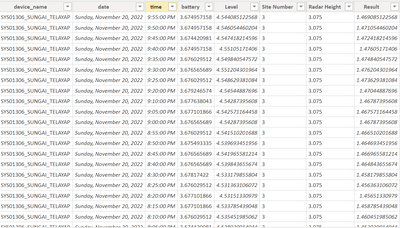
I have data from sensor that record data every 5 minute, example as below.


Mulwanto_0-1669016056785.png

then the question is, how to average column level to hours. Below the example output I want.


TimeAverage of Level
12:00:00 AM1.47
01:00:00 AM1.46
02:00:00 AM0.99
03:00:00 AM0.45
04:00:00 AM1.30


 Thanks.

1 ACCEPTED SOLUTION
daXtreme
Solution Sage
Solution Sage

Use Power Query to do this. It's easy. Group the data by (date and) hour (the hour can be extracted from time easily - there's a button that does it for you), and apply the average function over the column(s) of your choosing.

View solution in original post

3 REPLIES 3
daXtreme
Solution Sage
Solution Sage

Use Power Query to do this. It's easy. Group the data by (date and) hour (the hour can be extracted from time easily - there's a button that does it for you), and apply the average function over the column(s) of your choosing.

Hi daXtreme,


Thank's for the answer, this can be solution too, but how if I want the output in the Measure or another table.

If you create the table I'm talking about, you'll also be able to create a measure based on this.

Helpful resources

Announcements
November Power BI Update Carousel

Power BI Monthly Update - November 2025

Check out the November 2025 Power BI update to learn about new features.

Fabric Data Days Carousel

Fabric Data Days

Advance your Data & AI career with 50 days of live learning, contests, hands-on challenges, study groups & certifications and more!

FabCon Atlanta 2026 carousel

FabCon Atlanta 2026

Join us at FabCon Atlanta, March 16-20, for the ultimate Fabric, Power BI, AI and SQL community-led event. Save $200 with code FABCOMM.