cancel
Showing results for 
Search instead for 
Did you mean: 

The Power BI Data Visualization World Championships is back! It's time to submit your entry. Live now!

Reply
Anonymous
Not applicable

Aggregated Running total for YoY/Change

Hi Everyone,


I have an Install base (customer count) measure which distinctcounts the number of customer IDs as follows:

edayan_5-1649584043351.png


I also have a similiar measure for the same period last year:

edayan_6-1649584099288.png


I use the two together to create a measure which reflects the change in customer count:

edayan_7-1649584161273.png


I'm trying to create the same measure but Aggregated but I'm struggling with this and getting contiguous date selections dax-

edayan_0-1649583740568.png

edayan_1-1649538177899.png

Or when i try it this way i get too high numbers:

edayan_4-1649583965160.png


So to try to recreate what I have on the right end below, summing the months as a running/aggregate total.

edayan_0-1649537698104.png


Thank you everyone,

Eyal

1 ACCEPTED SOLUTION

Hi:

When you do your "Same Period LY measure, can you do it like this:

SPLY Install Base LABRA = CALCULATE([Install Base LABRA], SAMEPERIODLASTYEAR(Dates[Date]))
Then subtract your initial measure from this. I'll call it VAR Install Base LABRA
 
To get cumlative total for the VAR Install Base LABRA
 
= CALCULATE([VAR Install Base LABRA], FILTER(ALLSELECTED(Dates), 
 Dates[Date] <= MAX(Dates[Date])))

Normally this should work. Can you give it a try? Thanks

View solution in original post

5 REPLIES 5
Anonymous
Not applicable

Thanks @Whitewater100 , i'll try changing to my calendar table (i used the detail table date instead) and will update. 

Hello:

Great. I hope that works for you and if it does can you mark as solution? Thanks...

Whitewater100
Solution Sage
Solution Sage

Hi:

I think you may be gettting that message as you may not have a date table, with continuous dates starting before your data starts and ending at end of ear after. When you mark it as a date table and connect it on the one side to your many-side tables, then the built-in time intel functions work great. 


I can paste some date table DAX code that you can use as a Date Table if you want to.


Dates =


-- Specify a start date and end date

VAR StartDate = Date(2010,1,1)

VAR EndDate = Today()

VAR FiscalMonthEnd = 6


-- Generate a base table of dates

VAR BaseTable = Calendar(StartDate, EndDate)


-- Add the Year for each individual date

VAR Years = ADDCOLUMNS(BaseTable,"Year",YEAR([Date]))


-- Add the calendar month and other month related data for each date

VAR Months = ADDCOLUMNS(

    Years,

    "Month",MONTH([Date]),

    "Year and Month Number",FORMAT([Date],"YYYY-MM"),

    "Year and Month Name",FORMAT([Date],"YYYY-MMM"),

    "Fiscal Year", IF( FiscalMonthEnd = 12, YEAR([Date]), IF( MONTH([DATE]) <= FiscalMonthEnd, YEAR([DATE])-1, YEAR([Date]))),

    "Fiscal Month", IF( FiscalMonthEnd = 12, MONTH([Date]),

        IF( MONTH([Date]) <= FiscalMonthEnd, FiscalMonthEnd + MONTH([Date]), MONTH([Date]) - FiscalMonthEnd))

)


-- Add the Quarter and other quarter related data for each date   

VAR Quarters = ADDCOLUMNS(

    Months,

    "Quarter",ROUNDUP(MONTH([Date])/3,0),

    "Year and Quarter",[Year] & "-Q" & ROUNDUP(MONTH([Date])/3,0))


-- Add the Day and other day related data for each date   

VAR Days = ADDCOLUMNS(

    Quarters,

    "Day",DAY([Date]),

    "Day Name",FORMAT([Date],"DDDD"),

    "Day Of Week",WEEKDAY([Date]),

    "Day Of Year", DATEDIFF (DATE(YEAR([Date]),1,1), [Date], DAY) + 1)


-- Add the Week (assuming each week starts on a Sunday) and other week related data for each date   

VAR Weeks = ADDCOLUMNS(

    Days,

    "Week Of Month (Sunday)",INT((DAY([Date])-1)/7)+1,

    "Week of Year (Sunday)",WEEKNUM([Date],1),

    "Year and Week (Sunday)",[Year] & "-W" & WEEKNUM([Date],1))

-- Add an 'Is Working Day' column which will be true for all days but Saturday and Sunday.

var WorkingDays = ADDCOLUMNS(

    Weeks,

    "Is Working Day", NOT WEEKDAY( [Date] ) IN {1,7})


RETURN WorkingDays


I hope this helps!


Anonymous
Not applicable

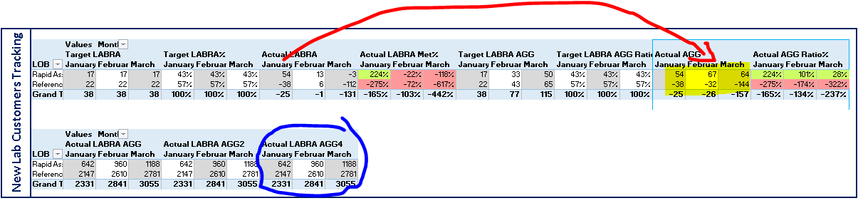
Hi @Whitewater100 I tried switiching as follows to my calendar table:

edayan_0-1649842375953.png


But I"m still not getting what I need to get (red arrow to yellow)

edayan_1-1649842484425.png

I'm getting the blue..


Hi:

When you do your "Same Period LY measure, can you do it like this:

SPLY Install Base LABRA = CALCULATE([Install Base LABRA], SAMEPERIODLASTYEAR(Dates[Date]))
Then subtract your initial measure from this. I'll call it VAR Install Base LABRA
 
To get cumlative total for the VAR Install Base LABRA
 
= CALCULATE([VAR Install Base LABRA], FILTER(ALLSELECTED(Dates), 
 Dates[Date] <= MAX(Dates[Date])))

Normally this should work. Can you give it a try? Thanks

Helpful resources

Announcements
Power BI DataViz World Championships

Power BI Dataviz World Championships

The Power BI Data Visualization World Championships is back! It's time to submit your entry.

January Power BI Update Carousel

Power BI Monthly Update - January 2026

Check out the January 2026 Power BI update to learn about new features.

FabCon Atlanta 2026 carousel

FabCon Atlanta 2026

Join us at FabCon Atlanta, March 16-20, for the ultimate Fabric, Power BI, AI and SQL community-led event. Save $200 with code FABCOMM.