cancel
Showing results for 
Search instead for 
Did you mean: 

Get Fabric Certified for FREE during Fabric Data Days. Don't miss your chance! Request now

Reply
psembaj
Frequent Visitor

Accumulated column according to several criteria

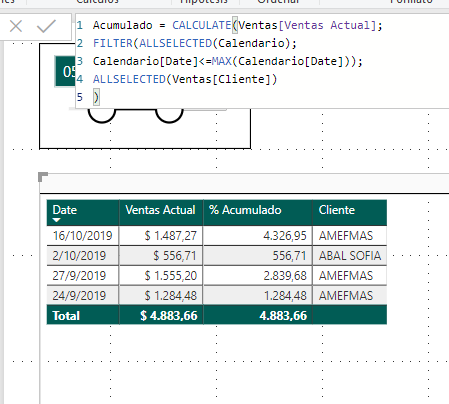
Hello! I am trying to create a calculated sales column. Currently create a measure called "Acumulado." Where it accumulates sales according to a calendar period that is selected.

ScreenShot019.png

Acumulado = CALCULATE(Ventas[Ventas Actual];
FILTER(ALLSELECTED(Calendario);
Calendario[Date]<=MAX(Calendario[Date]))
)

This formula performs the calculation correctly according to the period of time, but when I add the different clients, the accumulated one is done by client and time, I need that it does not take into account the clients. Can you help me?
 
3 REPLIES 3
Nathaniel_C
Community Champion
Community Champion

Hi @psembaj , if I understand what you trying to do. 
Let me know if you have any questions.

If this solves your issues, please mark it as the solution, so that others can find it easily. Kudos are nice too.
Nathaniel

Acumulado = CALCULATE(Ventas[Ventas Actual];
FILTER(ALLEXCEPT(Ventas;Ventas[Cliente]);
Calendario[Date]<=MAX(Calendario[Date]))


Did I answer your question? Mark my post as a solution!

Proud to be a Super User!


Thanks for answering.
It is not possible as you indicate, because in this way it is not filtering through the calendar. I need you to filter by calendar and by customer. It is understood?

Hi! Help me please!! LOL

Helpful resources

Announcements
November Power BI Update Carousel

Power BI Monthly Update - November 2025

Check out the November 2025 Power BI update to learn about new features.

Fabric Data Days Carousel

Fabric Data Days

Advance your Data & AI career with 50 days of live learning, contests, hands-on challenges, study groups & certifications and more!

FabCon Atlanta 2026 carousel

FabCon Atlanta 2026

Join us at FabCon Atlanta, March 16-20, for the ultimate Fabric, Power BI, AI and SQL community-led event. Save $200 with code FABCOMM.