
PowerBI authentication issue "missing_federation_metadata_url"
I am using federated user account and registered on PowerBI.com and trying to embed the report into my web application using the same accoutn credentials.
When I use the sample app provided in Git hub, I facing the following error.
missing_federation_metadata_url: Federation Metadata Url is missing for federated user. This user type is unsupported.
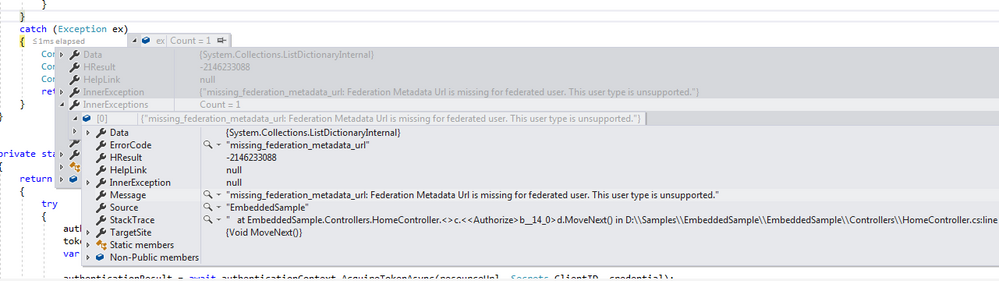
I have screenshared the issue with Microsoft Azure AD support team and they are also not able to resolve it. Kidnly look into this issue.
5 Comments
 v-ljerr-msft
Microsoft Employee
Hi syam_v,
I have screenshared the issue with Microsoft Azure AD support team and they are also not able to resolve it. Kidnly look into this issue.
In this scenario, I would suggest you create a support ticket on Power BI Support page for better assistance on this issue. :smileyhappy:
Regards
 syam_vFrequent Visitor
I am following up this issue with Microsoft support team.
 Pbi_EnthuRegular Visitor
Syam_v,
Were you able to resolve the issue. As i am getting the same error, when using APP Owns Data app from github.
Appreciate your help.
- syam_vFrequent Visitor
As per Microsoft support team suggestion this has to be enabled on ADFS server. Please check with your infra team on this and add the federation meta data url using cmdlet.
I am waiting for my Infra team to respond on this. My infra team has to update this setting. I will share the update once I connect after this setting change.
- Pbi_EnthuRegular Visitor