Forum Discussion

Wrong date format in subscription email preview
Hello,
I have a report that I am sending to multiple people in my organization using the subscription feature. Most people only view the preview screenshot that is attached in the subscription e-mail. The problem that I am facing is that in the e-mail preview the date format is not converted according to my Power BI desktop settings nor my Internet Browser settings.
My question is: Is there a way to change the date format of the e-mail preview of the subscription feature in Power BI, or is the e-mail preview always based on the location where my reports are hosted?
Thanks in advance,
Davo
4 Replies
- AnonymousNot applicable
14/03/2001 (dd/mm/yyyy): displays correct in Desktop, Service & Subscription
*14/03/2001 (Short Date): displays correct in Desktop & Service but NOT Subscription - v-eachen-msft
Community Support
Hi Anonymous ,
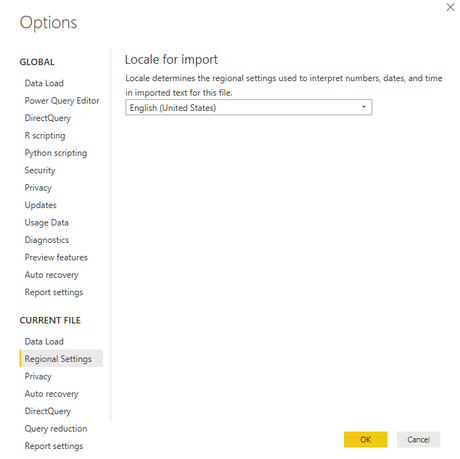
Click File-> Options-> Regional Settings and set the region to your region.
- AnonymousNot applicable
Thanks for your reply v-eachen-msft . My Power BI regional settings are already set in the way that I want it to be. In Power BI desktop and Power BI Service my report works just fine. The problem is that the email preview is using the wrong date time format. It seems that the email preview is not using the Power BI desktop settings nor the Power BI Service settings.
My question is, what else can I try, besides the Power BI Desktop or Power BI Service settings, to change the date time format in the email preview?
Thanks in advance,
Davo
- v-eachen-msft
Hi Anonymous ,
After my testing, i couldn't reproduce this issue. I would suggest you to create a support ticket here.