Forum Discussion

sharing sharepoint embedded report with external users
 7 years ago
Hi aghilesiker,
Based on my test, We can share the embed report in SP site to external users by the following steps.
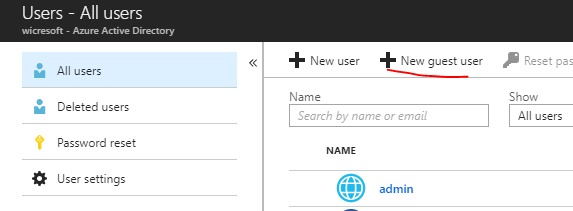
1.To add the external user as guest to Azure Active Directory in advance and add them to the Office 365 group. (You can add them as member in the app workspace) .For more details, please check the online document.
2. Then embed the report in SP site, then the external user can access the report.
Please notice here both accounts are pro. For Power BI Premium workspace you can just add them as guest user in AAD and add them to the Office 365 group. The pro license is not required for the ones that you want to share content to.
Regards,
Frank
 Community Support
Hi aghilesiker,
Based on my test, We can share the embed report in SP site to external users by the following steps.
1.To add the external user as guest to Azure Active Directory in advance and add them to the Office 365 group. (You can add them as member in the app workspace) .For more details, please check the online document.
2. Then embed the report in SP site, then the external user can access the report.
Please notice here both accounts are pro. For Power BI Premium workspace you can just add them as guest user in AAD and add them to the Office 365 group. The pro license is not required for the ones that you want to share content to.
Regards,
Frank
Community SupportHi aghilesiker,
Does that make sense? If so, kindly mark my answer as the solution to close the case please. Thanks in advance.
Regards,
Frank