Forum Discussion

Secheduled Refresh Issue - Cannot Set Credentials for Dataset
Hi,
I'm trying to setup a Scheduled Refresh for a dataset (small dataset - about 50MB) in the Power BI Service which points to Azure SQL Data Warehouse. I'm entering the Authentication Mode as "Basic", SQL username and password in the popup box but it just hangs and doesn't authenticate - spinning wheel. I'm able to connect to the Azure SLQ Data Warehouse service by using "Get Data" so I'm stumped as to what the problem is.
Has anyone else had issue?
Thanks
Andy
5 Replies
- Greg_DecklerCommunity Champion
I would check your firewall and other settings on your Azure SQL DW. Generally, for things like Azure SQL DB and such, there is a check box to allow other Azure services to connect to it. You have to do this, for example, if trying to connect to an Azure SQL DB from something like Azure ML. I wonder if there is something similar going on here since it would be the Power BI gateway in the Service connecting to your Azure SQL DW.
 raa_alencarNew Member
I'm having the same problem, stuck in authentication loop for BASIC credential refresh
- v-caliao-msftMicrosoft Employee
Anonymous,
Can you reproduce this issue? If you can, please capture the following logs while recreating the issue.
Fiddler Trace
============
- Install Fiddler from http://www.telerik.com/download/fiddler/fiddler4 if not already done
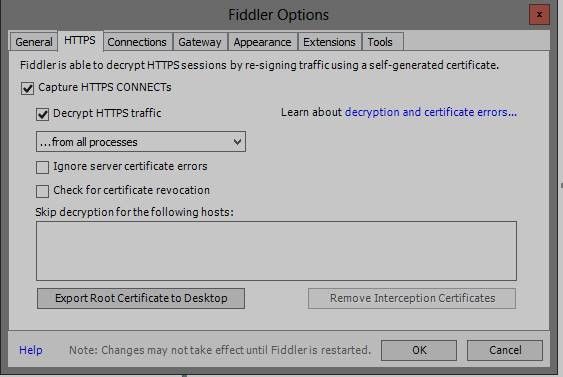
- Launch fiddler, then click Tools > Fiddler Options
- Click the ‘HTTPS’ tab.
- Verify the options are set as shown in this screenshot:
5. If fiddler prompts you to trust their root certificates, then click ‘Yes’.
6. Then navigate to repro the problem while fiddler is capturing traffic.
7. After the trace is captured, go to File > uncheck box next to Capture Traffic
8. File > Save > All Sessions and post it here.
Regards,
Charlie Liao
- AnonymousNot applicable
Hi, can I send it to someone? I'd rather not post it here. Thanks
Andy
- AnonymousNot applicable
I can enter the credential for the SQL Server if I remove the "secure" part of the connection string, e.g:
mydatabaseserver.database.secure.windows.net will NOT allow me enter credentials on the PBI Service - just hangs
mydatabaseserver.database.windows.net WILL allow me enter credentials on the PBI Service