Forum Discussion

Date Issues
Dear Team ,
I have Created one report in powerbi Desktop with Date Slicer ,
By default , date its showing MM/DD/YYYY format , but requirement is DD/MM/YYYY format so I have used
Formate function as mentioned { columnname = formate(Teablename[columnname],"DD/MM/YYYY") } post that its displaying in reqquired formate(DD/MM/YYYY) desktop level .
Date formate displayed in Desktop Formate of DD/MM/YYYY.
once i published in service its shown MM/DD/YYYY formate ,can you please help me on this how can we solve the date issue in service .

Date formate displayed in Desktop Formate of MM/DD/YYYY.
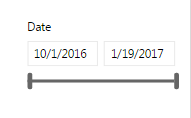
Note : clients are not showing interest to change the language and date formates in Chrome settings ,So when client open the report how it will display the date in formate of DD/MM/YYYY with out changing the browser settings.
Kindly help me on this .
Thank You in Advance.
Regards,
Srinivas.
3 Replies
- AnonymousNot applicable
Hi All ,
Still i am facing the same issue , Kindly help me on this issue .
Thanks,
Srinivas.
 v-yulgu-msftMicrosoft Employee
Hi Anonymous,
Here is a similar thread for your reference:
Date format changing desktop to web
Best regards,
Yuliana Gu
- AnonymousNot applicable
Hi Yuliana Gu ,
Thank you for your response , I have gone through the post , But solution given as needed to change the browser settings (Need to change the language UK). But the problem is client it's not showing interest to change the brwoser settings . So by default need to display date format DD/MM/YYYY in power bi service without changing the browser settings.
Kindly provide me the solution.
Thank You .
Srinivas.