Forum Discussion

Annoying differences in data between Desktop data and Server Data
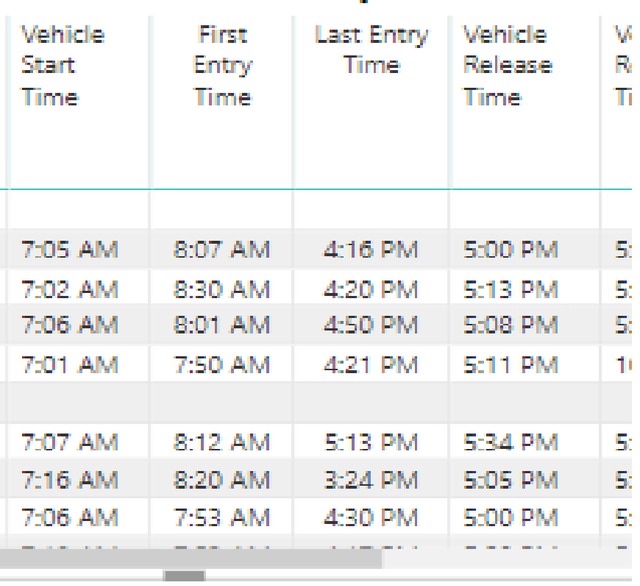
I've only started noticing this issue in the past 2-3 days. The following are screenshots of the exact same visual, one in the Desktop and the other in Power BI app downloaded from the Windows store:
Screenshot from the Desktop:
Screenshot from the end user app:
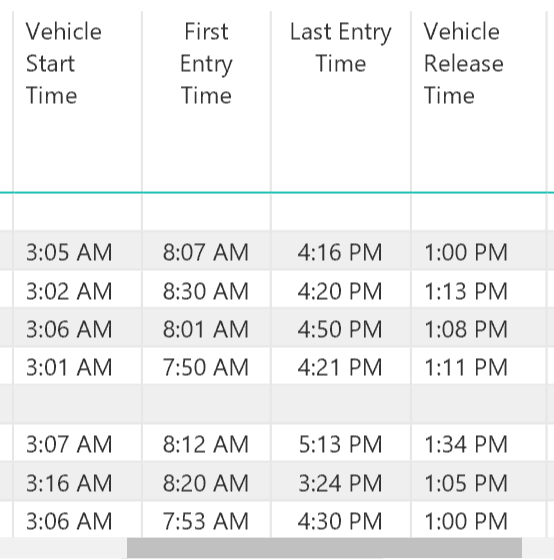
As you can see, columns 2 & 3 are exactly the same, as they should be, but in Columns 1 & 4 there is a difference of 4 hours between the values. Seems like a bug?? :smileyfrustrated:
What do I do?
Additional info: Columns 2&3 are pulled from one table, and Columns 1&4 are from another table.
Thank you for your replies.
I figured out the bug. The column in question was formatted as "Date & Time" whereas the right format to be used was "Date, Time, Timezone". The Desktop application and the online service were interpreting the data differently due to this.
4 Replies
- GilbertQSuper UserHi there
Could it be due to the data refresh being at different times?
What I mean is if the data is changing and you refresh your PBIX manually, and in the Power BI Service it has a scheduled refresh then the numbers would always be different?  v-yuta-msftCommunity Support
What's the data source? Are the two reports using the same data source? Has anyone refresh the data source before this issue happens?
Community Support Team _ Jimmy Tao
If this post helps, then please consider Accept it as the solution to help the other members find it more quickly.
 amalmHelper III
Thank you for your replies.
I figured out the bug. The column in question was formatted as "Date & Time" whereas the right format to be used was "Date, Time, Timezone". The Desktop application and the online service were interpreting the data differently due to this.
- GilbertQSuper UserHi there
I learn something new every day, that is good to know. Thanks for posting it here!
