Forum Discussion

Facebook Analytics
 Anonymous9 years ago
Hello kumarmanchala,
Yes, There is a way to get analytics of your Facebook page in Power BI desktop.
Please See the below article to get your answer
Facebook Integration with Power BI
Thanks and Regards,
Hemal 9 years ago
Thank you for the information. This really help!
 Advocate II
Guess we won't have news anytime soon ...

Hi.
Starting API v2.8 only 5 columns are retrieved, if you want anything more than that you need to mention that specifically using URL params as shown below. You can check the column list for posts here: https://developers.facebook.com/docs/graph-api/reference/v2.9/post
Then in the advanced Editor:
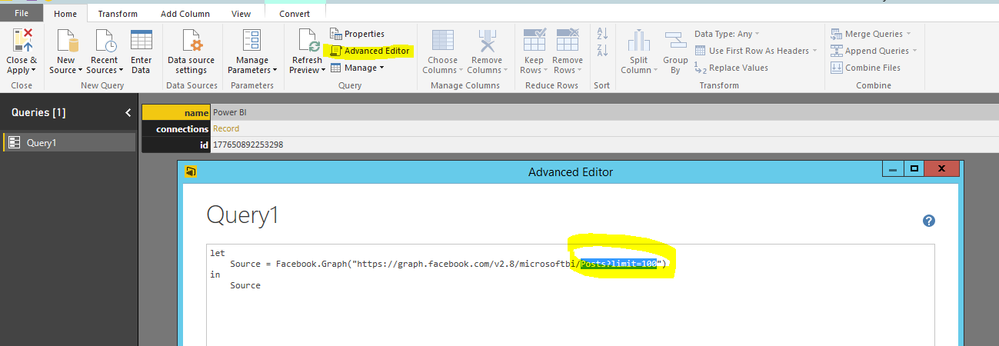
change it with:
Source = Facebook.Graph("https://graph.facebook.com/v2.8/microsoftbi/posts?fields=id,
admin_creator,
application,
call_to_action,
caption,
created_time,
description,
feed_targeting,
from,
icon,
instagram_eligibility,
is_hidden,
is_instagram_eligible,
is_published,
link,
message,
message_tags,
name,
object_id,
parent_id,
permalink_url,
picture,
place,
privacy,
properties,
shares,
source,
status_type,
story,
story_tags,
targeting,
to,
type,
updated_time,
with_tags&limit=100")
- Franklin18 years ago
Advocate I
Thanks a lot!
One more question for you - Is it something sustainable, or we could suddenly lose all these important parameters from our reports, due to changes in the API?
My concern is, that I will create the reports I am looking for, and publish these reports and share it with the users, and in a few months from now, I will suddenly lose all the data from the report.
This is happened when the API changes to V2.8, but I think that with the string below we are no longer dependent on the API version - is that correct?
Thanks again!
- Anonymous8 years agoNot applicable
Franklin1, I agree with you, its not good idea to depend on the API, it keeps changing. I too experience the same problem.
Thanks,
Thimma
- Rod8 years ago
Oh Sir, you are amazing!
Thanks a lot for sharing this information. It worked fine for me and now I can access all related information.
Regards,
laubar1 wrote:Hi.
Starting API v2.8 only 5 columns are retrieved, if you want anything more than that you need to mention that specifically using URL params as shown below. You can check the column list for posts here: https://developers.facebook.com/docs/graph-api/reference/v2.9/post
Then in the advanced Editor:
change it with:
Source = Facebook.Graph("https://graph.facebook.com/v2.8/microsoftbi/posts?fields=id,
admin_creator,
application,
call_to_action,
caption,
created_time,
description,
feed_targeting,
from,
icon,
instagram_eligibility,
is_hidden,
is_instagram_eligible,
is_published,
link,
message,
message_tags,
name,
object_id,
parent_id,
permalink_url,
picture,
place,
privacy,
properties,
shares,
source,
status_type,
story,
story_tags,
targeting,
to,
type,
updated_time,
with_tags&limit=100")