Forum Discussion

 Advocate I
iPad Unknown Error when looking at Report
We have built a dashboard as a PowerBI Pro user. This dashboard gets data from an on prem SSAS Tabular Model.
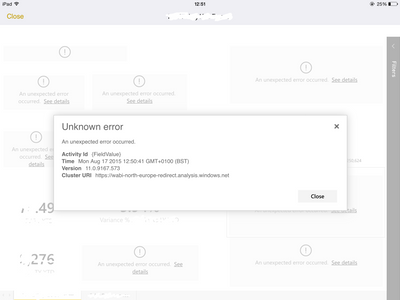
The dashboard works absolutely fine in the browser however when browsed through the iPad, we get the attached error messages for various components (KPI, Gauges etc) of the dashboard.
The component errors are not consistent either, so sometimes certain components work but when you refresh others will work but not the ones from before.
As I said the dashboard works fine in the browser, this is only an issue we're facing on the iPad.
Hi,
I have escalated the issue to the relevant team to check the issue you reported about.
I will update you about the progress or if we need any further details.
Thank you,
Dana.

10 Replies
 metaran
Microsoft Employee
Hi,
Thank you for reporting this, to help us investigate can you share some more details?
- Do you have Role Based Security enabled on this SSAS model?
- What iPad version and OS version installed on it?
thanks,
Meital
 RahilBukhari
Hi
Yes we have role based security, however I'm an admin user with full permissions on the SSAS instance and Tabular model.
I have an iPad Air (Model MD789B/A) with iOS 8.4 installed. I also have version 4.1 of the Power BI app.
Any help would be appreciated!
Rahil
- RahilBukhari
Update:
If i flick between the pages on my dashboard, eventually it's able to render all KPI's and Gauges. So basically need to flick back and forth between pages and eventually everything appears. It's almost as if there's a throttle somewhere which means it's either rendering or querying the source 2-3 items at a time. Very weird! All this use to work before, it looks like a new bug thats been introduced recently.