Forum Discussion

Timezone difference causing error - cant display NOW()
All going well till I have to give a presentation. :cattongue:
I live in New Zealand and discovered today that the PowerBI website seems to be running on GMT time.
Everything on PowerBI Desktop program is showing today as Friday (which it is where I am) but when uploaded online the PowerBI website still thinks its yesterday.
I created two measures to check.
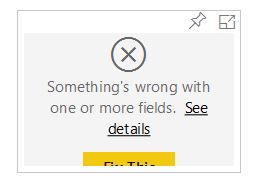
NOW() and TODAY() and reuploaded the PBIX file - works fine on the desktop but online it shows an error
Fix This - just removes the tile
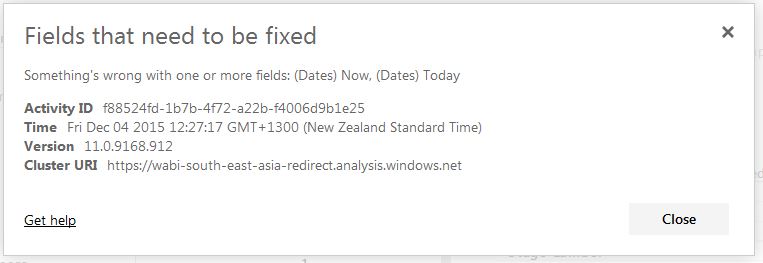
See details gives the error
is there any way I can change the timezone on the PowerBI site? Sure its somewhere I just need to change the setting.
Thanks
ED
11 Replies
- Greg_DecklerCommunity Champion
I'm not sure I follow this, it looks like from the error details that it has the right time and timezone, GMT+1300 (New Zealand Standard Time) and it shows Friday...
- elliotdixonResponsive Resident
Hi Greg_Deckler
It did indeed show my timezone in the error but the entire report still thought it was yesterday.
At 12pm my time (12am GMT) everything sorted it self out as our days match now.
Is there anywhere in PowerBI online you have to set your timezone?- Greg_DecklerCommunity Champion
elliotdixon, the only place that I know that you can set timezone is when you schedule your refresh.
 leonardmurphySkilled Sharer
I was intrigued, so I did the same thing: created 2 measures (NOW and TODAY) and uploaded them to PowerBI.com.
I'm in US Central Time, so it's 9am right now. In Power BI Desktop, it shows as 9am. On the website, NOW() resolved to 3pm (which is GMT).
Being in central time, I doubt I'd get the error you're seeing (since I am never a day ahead of GMT).
But I would definitely send a frowny face if I were you.
I hope your presentation went well despite this!
- elliotdixonResponsive Resident
Cheers for the help everyone - I have lodged a frown with PowerBI. Hopefully this is something they can get on to quickly. :smileyvery-happy:
 beedeagleAdvocate I
hi team,
i have the same issue. the time display correctly, but it show the different time after i publish it on dashboard.
- elliotdixonResponsive Resident
Hmm - something seems to have happened with this.
I have noticed that there is a local times link within the Settings of the Dataset when I upload something now.
My measures are still incorrect but I wonder what this means.
- AndrewDangHelper IV
I have the same issue.
Greg_Deckler, would you please help us with this?
I have an issue with setting the right local time for our Power BI Service. I have the same measure to pull the current time. The Power BI desktop file pulls up 1/16/2017 4:36:02 PM which is the correct local time. However, the Power BI Service file pulls: 1/17/2017 12:36:02 AM, which is 8 hours ahead of the time. I am wondering where do I go about setting this local time on the Power BI Service side?
This issue results into not being able to pull up the overtime and data from yesterday starting from 4:00PM every day. It is pulling data for today (which is incomplete data)
Thanks
Andrew
- leonardmurphySkilled Sharer
reza_rad blogged some ideas for working around this issue here: http://radacad.com/solving-dax-time-zone-issue-in-power-bi
 matttFrequent Visitor
I'm having a similar problem where my relative date filter won't pick up today when I do "in the last x days" filter (despite ticking the "include today" check box). Very frustrating as it adds a manual element to my daily reporting.
I'm also in New Zealand, so think this is a time zone error.
PowerBI team? what's the story.

