Forum Discussion

 Helper IV
Time Intelligence: TOTALMTD vs DATESMTD vs DATEADD
Hi,
I am trying to have a floating measure that tells us the total write-off amounts from the start of the current month to the current day in the current month.
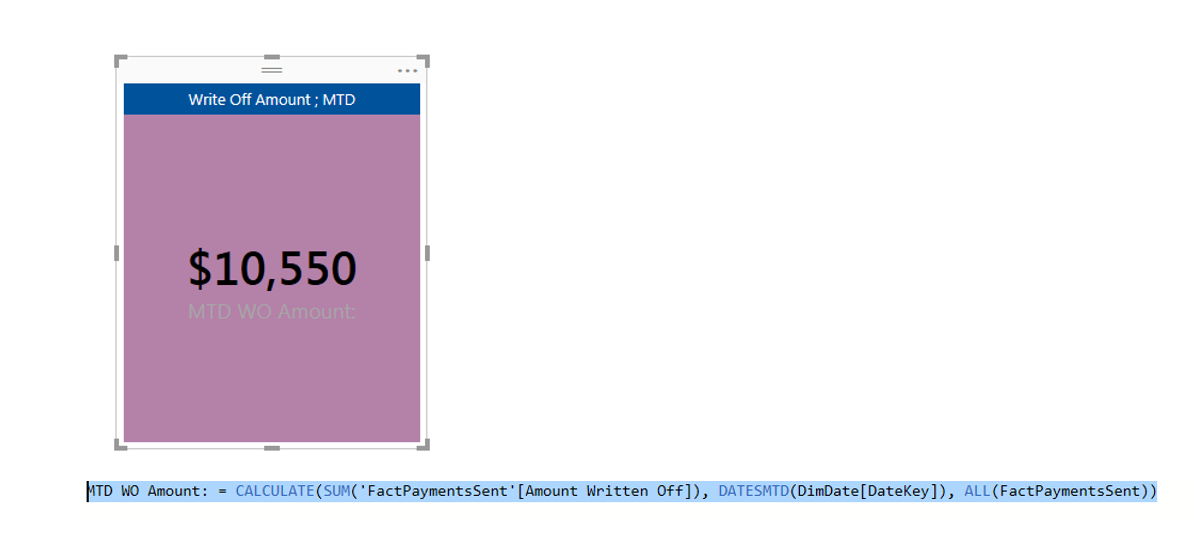
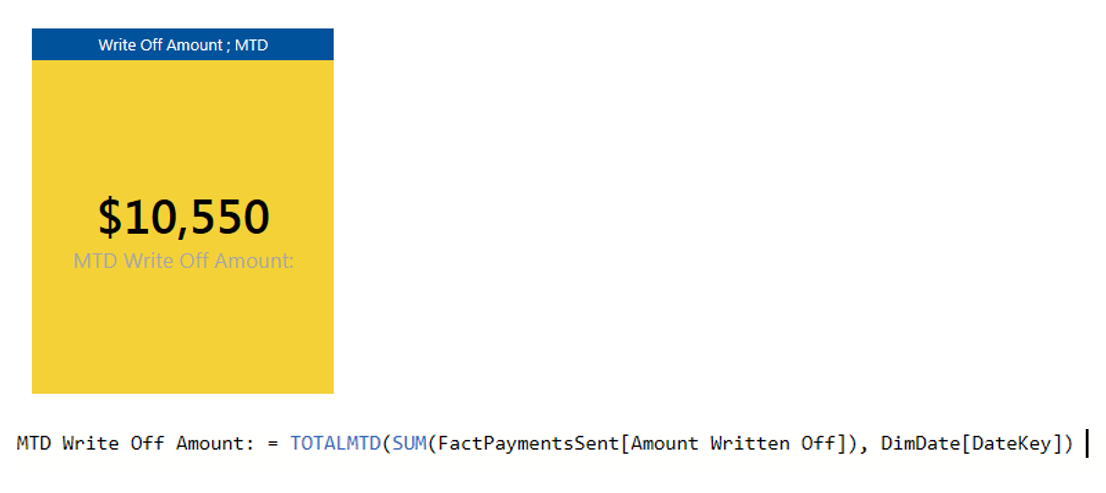
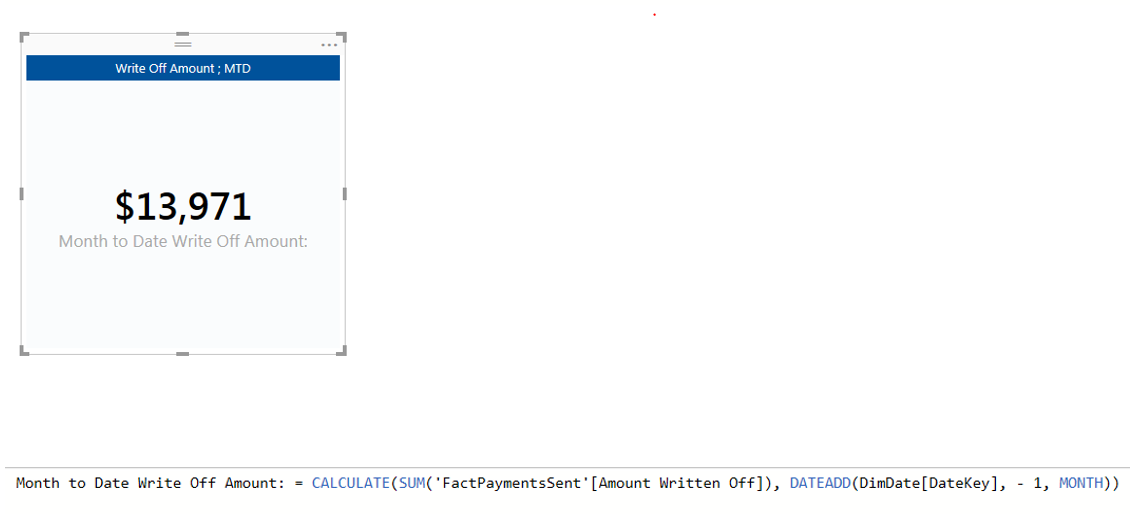
I have done this 3 different ways. 2 of my 3 give me the same answer.
Photo attached:
Thanks in advance :)
If you want to understand time intelligence better in DAX, read this excellent blog post.
In short here is the behavior of the three functions you mentioned.
TOTALMTD(): This is only syntactic sugar, all it does is give you the following:
CALCULATE(
    [measure]
    ,DATESMTD(DimDate[Date])
)
DATESMTD(): This works in a date dimension, which must have contiguous, nonrepeating dates from January 1 of the first year you have data to December 31 of the last year you have data. The function returns a 1 column table made up of dates between the first of the month of the current date in context and the current date in context.
DATEADD(): This essentially gives you a range of dates (one column table) based on the number of intervals you've requested in either direction. It does not behave intuitively compared to a DATEADD() function in any other language, and I am not aware of any circumstances we (we being a Microsoft BI consultancy with a number of DAX experts) have decided this is the right function to use for any of our work. There is a good description in the linked blog post at the top of my reply.

16 Replies
 cwayne758
*UPDATE* Month Date Write Off Amount does not give me the current MTD value.
Could someone possibly explain why? Or when is an appropriate time to use DATEADD
- konstantinos
Memorable Member
There is no filter context ( unless you use a slicer ) in a card that has a month. You need to pass a filter in the formula
maybe this works or something similar
current MTD = CALCULATE ( [MTD WO Amount]; FILTER ( ALL ( DimDate ); DimDate[Year] = YEAR ( MAX ( DimDate[DateKey] ) ) && DimDate[DateKey] = MONTH ( DimDate[DateKey] ) ) )  DjorranRegular Visitor
Hi,
When you use dateadd() like that you get one whole month. So if the date is the 10th of october you will see the value from the 10th of september to the 10th of october.
If you use dateadd() you first need to calculate how many days there is to the first date in that month.
Kind regards,
Djorran
 PowerBIGuy
Responsive Resident
To use time intelligence you have to use a true date column. the time calculations will not work with a date key. I also find it useful with creating calculations in the context of a month to not only format as date but also use the transform tab to format my column to equal the end of the month.
- greggyb
Resident Rockstar
If you want to understand time intelligence better in DAX, read this excellent blog post.
In short here is the behavior of the three functions you mentioned.
TOTALMTD(): This is only syntactic sugar, all it does is give you the following:
CALCULATE(
    [measure]
    ,DATESMTD(DimDate[Date])
)
DATESMTD(): This works in a date dimension, which must have contiguous, nonrepeating dates from January 1 of the first year you have data to December 31 of the last year you have data. The function returns a 1 column table made up of dates between the first of the month of the current date in context and the current date in context.
DATEADD(): This essentially gives you a range of dates (one column table) based on the number of intervals you've requested in either direction. It does not behave intuitively compared to a DATEADD() function in any other language, and I am not aware of any circumstances we (we being a Microsoft BI consultancy with a number of DAX experts) have decided this is the right function to use for any of our work. There is a good description in the linked blog post at the top of my reply.
- elliotdixon
HI All,
Realise this topic is marked as solved but I have the same issue. Need to calculate the total for last month.
greggyb love your link. Heaps of information.DATESMTD - I can't use this as my dates table does not continue past the date of the most recent data. (i.e. today)
DATEADD - when using a calculation
Last_Month_TotalKms = CALCULATE([Kms],DATEADD(Dates[Date],-1,month))
I just get the full total for all Kms. The DATEADD filter does not affect the calculation at all. Value does not change when anything in the DATEADD part of the formula is changed. (e.g. if I change it to -5 or the month to day nothing happens)
I am wondering if there is another way of approaching the question.
if there is any column calculation to show if in previous month.
e.g. I have a calcuation for if in previous week
IsInCurrentYear = if(YEAR(NOW())= [Year],1,0)
and this feeds
IsInCurrentWeek = if([isInCurrentYear] && WEEKNUM(NOW())=[WeekOfYearNumber],1,0)
And
IsInLastWeek = if([isInCurrentYear] && (WEEKNUM(NOW())-1)=[WeekOfYearNumber],1,0)
So if I could get another column for IsInPreviousMonth that would be great.
Anyone know how to do that?Cheers

