Forum Discussion

Table visualization and case sensitivity
Why does Power BI Desktop change case?
My data is case-sensitive:
DATABASE_NAME ARCHIVED_DATE
---------------------------------------------------------------- --------------------
EPCD13D 17-DEC-2017 12:00:00
epcd13d 25-DEC-2017 12:00:00
epcd13p 17-DEC-2017 12:00:00
epcd13p 25-DEC-2017 12:00:00
epcd13sby 17-DEC-2017 12:00:00
epcd13sby 25-DEC-2017 12:00:00
epcd13t 17-DEC-2017 12:00:00
epcd13t 25-DEC-2017 12:00:00
When I pull this into a table visualizaion:
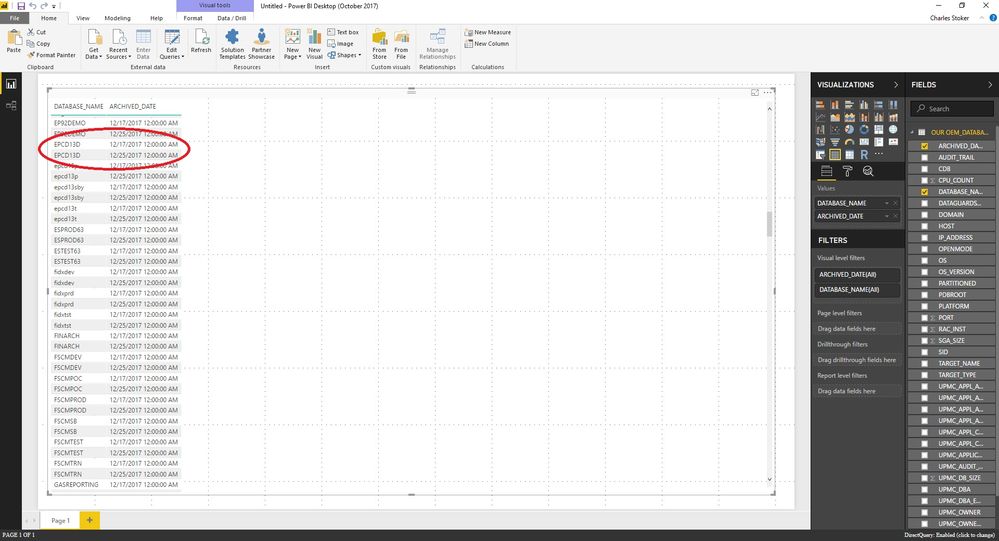
Is this a BUG, FEATURE, or PEBKAC?
Happy New Years Day!
Add custom column, not conditional column.
Conditional Column options are too basic to handle List.Contains or invisible characters.
Then paste into the custom column window:
if List.Contains(List.Transform({97..122}, each Character.FromNumber(_)), Text.Start([DATABASE_NAME], 1)) then Character.FromNumber(8236) else ""
I'm assuming your column is named [DATABASE_NAME], but if not, then substitute the right name.
Basically...
List.Contains({a..z}, "e" is true.
List.Contains({a..z}, "E" is false.Fred

8 Replies
 vijay_kolisettyFrequent Visitor
Hi
I think its treating the first values format with the second value. You can post your query in Power BI idea forum to make a glance to the respective people.
Regards,
Vijay
- freder1ckKudo Kingpin
Power Query is case sensitive, so you could remove duplicates there and add an index as a unique id. In most regions, DAX is case insensitive, so it would be good to have a unique identifier.
Table visualizations have a related problem, in that they cannot show rows with duplicate data. So, if you have a check detail with 2 separate line items of $26.99 for different items with the same description, it will display only one row. You would have to include the order line number as well. The idea to prevent this kind of aggregation is here.
Fred
 stokercwNew Member
Thanks Fred, that is what I was presuming.
Seems like a pretty serious shortfall imo.
I can add an index to get both rows, but still will not be able to display the apprropriate values as they both show up the same.
Yes, I could add other fields as well but that's not really the point.
- freder1ckKudo Kingpin
I see what you mean now! Here are two ways to force the lowercase to appear. One is by appending the index to the name. The second is to append an invisible character to the name if the name is first letter is lowercase. Appending a space at the end won't work.
In Power Query, I add a custom column for invisible space if the first character of the name is lowercase.
if List.Contains(List.Transform({97..122}, each Character.FromNumber(_)), Text.Start([Column1.1], 1)) then Character.FromNumber(8236) else ""
97-122 are the ascii characters for lowercase letters. 8236 is an invisible character.
I then append the Lowercase Space column to the database name.
An alternate way is to pad the start of the name based on the index value:
Text.Repeat(" ", [Index]) & [Column1.1]
The table visualization strips out leading spaces, but still sees the values as unique.
Fred