Forum Discussion

SLICERS -> blank value
I have a question about using slicers in my report.
I make slicer which show the two years, I have just two values in my year table.
But I also see blank value , is it possible to hide this one ?
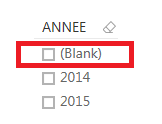
Thanks for your time
GGR
 Anonymous11 years ago
adamgor A work around I use quite often is to start with a visual that allows you to filter the value, select/exclude the blank, then change the visual to a slicer and the blank should be gone.
63 Replies
 BC-AI
BC-AIAdvocate I
I right-clicked on (Blank) in the visual and clicked "Exclude".
The "(Blank)" grouping no longer appeared in my visual which was good enough for my purposes.
 Mariya_JosephNew Member
This is the only thing that worked for me !!! Thank you so much
 rehanmaqbul
I was having the same issue. Here is the solution:
1: Go to Model (the last on the left side menu)
2: See if there is an unwanted relationship between data sets. (There must be one)
3: Delete the relationship and boom (now check)
 kleigh
Responsive Resident
This pointed me in the right direction, but the solution was a little different. I checked my relationships and all of them were wanted. However, one of the tables had a value in the related field that was not present in the slicer table version of that field. This was enough to create the blank value.
In my case, this was actually a data error and fixing the field removed the blank. Other people may find the other value is correct, in which case the solution may be to add the extra values to the slicing table.
The general principle is the same though - the blank may be coming from a relationship one way or another.
Edit: Note this can also happen even when the unexpected value is not in a directly related table, but in one reachable through a chain of relations. The reachable table does not have to be in use on the report page.- AnonymousNot applicable
I had the same problem, some rare values were not recorded in the dim table.
Thank you very much!!
- JosephTRegular Visitor
This worked for me! This solution solves the problem at the root of the problem. Not just putting a bandaid to cover the problem without really solving the problem. Thank you rehanmaqbul!
 intrasight
Helper IV
I also have "(Blank)" showing up. But there are no records with blank so the "filter" workaround isn't working. So I'll ask again - why is there a "(Blank)" in the slicer?
- AnonymousNot applicable
It is an ennoying bug. Please vote here :
- intrasight
I used an "is not blank" filter and now "(Blank)" is banished.
- TimothySNew Member
Even though "Blank" is not showing up on other visualizations, uncheck "Select All" and select only the items you want. This will fix your problem.
 EZgrafton
Advocate II
It does not! (Blank) still appears. :mansad:
- bourquejeffFrequent Visitor
Another great way to deal with this is using the custom visual "Chicklet Slicers" by Microsoft. I had this slicer issue - mine included not only blanks, but also other records represented in the slicer that had a null or zero value for the measure I was hoping to filter them by. Using the chicklet slicer, the report not only looks better, but easily filtered out the records in the slicer that did not have a value by dragging the measure I was using into the data field of the slicer visual.
- AnonymousNot applicable
Thanks you bourquejeff was struggling to find a way around that one that didn't involve a Page Filter......
- kleighton
Helper II
 matemusic
Advocate III
If I have blank value in slicer i move the same column that is in slicer to page or report level filter and then chose to show just non blank values- PwC_MarcelNew Member
In my case the (Blank) on a slicer only appears if there is more than one relationship to the dimension table. So it seems like a bug since I do not have any blanks within my data.
 mattyt0406Regular Visitor
I was able to address this by simply changing the way the table interact with each other. In the relationships section in Desktop you need to select the relationship and the option on the bottomr right "Cross filter direction" needs to be set to "Both".
One more bit of advice...if you want to use Row Level Security you cannot check the box "Apply security filter in both directions". No matter the difference having the Both should address your issue though as long as you do it on the relationship to the table the filter belongs to.- AnonymousNot applicable
Thank you! You're the best this worked and I was literally losing it over this tiny lil error. My data did not have any blanks and I tried everything from removing blanks, replacing null, etc.
- ignas
Hey guys :)
I am not sure if anybody did not have the solution earlier but I did this:
- Create 2 filters
- First filter filters second filter, but nothing else in the page. Then I hide this filter somewhere in a corner with changing colors.
- Then second filter does not have anymore options that are not selected by the first filter.
Regards,
Ignas
- AnonymousNot applicable
Thank you very much, that was the solution for me.
- PwC_MarcelNew Member
In my case the (Blank) on a slicer only appears if there is more than one relationship to the dimension table. So it seems like a bug since I do not have any blanks within my data.
- Nishantjain
Continued Contributor
I don’t think this is a bug. The reason you may think this is a bug is because the "Slicer" treats "Blanks" different to other visuals. Try the following to see if you have the same issue as I did and then how you can fix it
Issue:
Fact Table
[Column 1]
a1
a2
a3
Data Table
[Column 1] [Column 2] [Column 3]
a1 b1 100
a2 b2 200
b3 300
Relationship
Fact Table [Column 1] >> Data Table[Column 1]
Bring [Column 1] from Fact Table into slicer
Bring [Column 1] from Fact Table into table
You will see [Blank] in the Slicer although you don't have any blank in this column in the fact table. But, when you bring the same field in the a table visual you don't see the blank. The table visual doesn't show the blank because a table visual (or any other visual) will remove the row if all the values in that row is blank.
The reason for you see Blank in the slicer is because the Data Table has a "blank" value in [Column 1].
If you bring [Column 1] from the Data table in the "Table" visual, you will not see the blank. This is because the "table" will automatically remove the blanks. Bring in another [Column 2] from Data table in the "table" visual and you can now see the blank.
HOW TO FIX THIS
Create a table from the Data table, bring in the column causing you this issue and another column (both from the Data table) without summarizing any of the field (i..e don't add or count any of the field). You will see the row with the blank field.
Thanks
Nishant
- yhael1121Frequent Visitor
Hi Team,
im new to power BI so please bare with me. im working on a performance report for our company but when i created sumary table with Gauge Chart, it shows a blank in the slicer. i checked all my raw data but i cant see any blank in there. please see below for the samples.
actual table.sample table. just to see if i can see the employee with blank values.
 adamgor
Microsoft Employee
I have data that has 0 blank values, yet I still see (Blank) on many of my slicers
Any way to fix this?
- AnonymousNot applicable
adamgor A work around I use quite often is to start with a visual that allows you to filter the value, select/exclude the blank, then change the visual to a slicer and the blank should be gone.
 dineshkumar_vrv
Helper I
Hi, I want to replace my blanks into word "Blanks" so that I can show them in the slicer as blanks itself as one line item, is it possible ??
I have list of word in the 1st column
column1
Apple
Bag
Car
<- Blank
Echo
Expecting Output:
column
Apple
Bag
Car
(Blank)
Echo
Thank you in advance
- asreenu
hmm..I wonder what the PowerBI team is doing if they are not even looking at the feedback. This is a very visible and simple problem for two years and still not fixed. How can we trust any MS products?


