Forum Discussion

odata currency fields missing
When I create a link to our on-premise Dynamics CRM installation using ODATA, none of the really important fields (e.g. Opportunity Weighted Revenue, Opportunity Budget, etc.) are shown on the field list on the right of the report designer. If I go manually into the ODATA feed query, I can see that all the columns, including Weighted Revenue are selected, but there are two big issues:
- First, they are not showing up in the table view. It looks like all the fields that are currency types are missing from the field list.
- If I look more closely and manually select just one column (e.g. Weighted Revenue), the column is now finally seen, but NOT as a value, as a link that says "Record", not the actual weighted opportunity value.
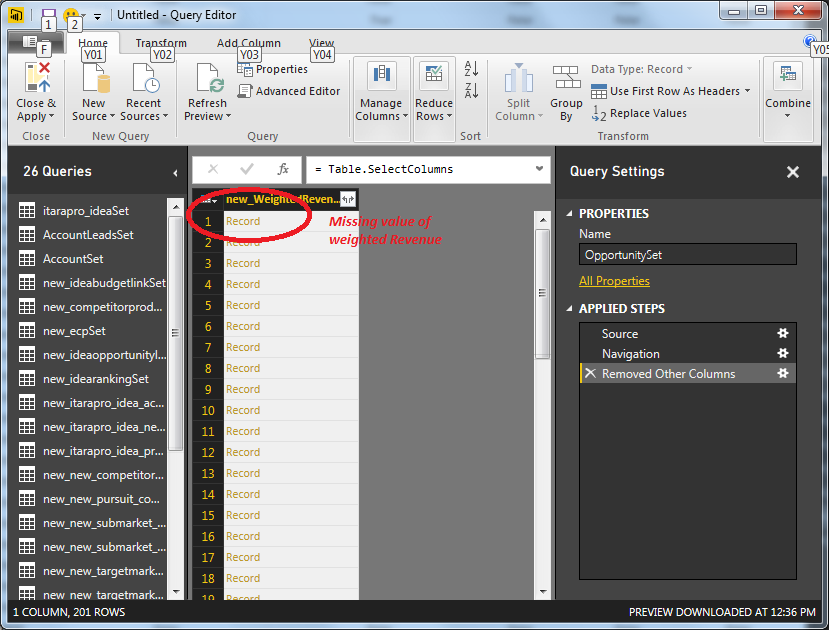
Any thoughts?
Thank you all for your help.
Best Regards,
Eric
2 Replies
 RSDYNRNew Member
One more key point - when I use a direct SQL Server connection to our Dynamics CRM DB, all the fields are pulled through with no problems, including the weighted revenue and revenue fields.
 AnonymousNot applicable
RSDYNR If I recall correctly when I was doing CRM work in PBI, you need to click the
and select the outputs that you want. When you pull in your CRM data PBI determines all the relationships and builds those into the tables by default... Let me know if that works.