Forum Discussion

 Helper III
Get the values from an excel rather than hardcoding
Here is the requirement. I have the below matrix from a dataset containing some text values in End User Trade Name.
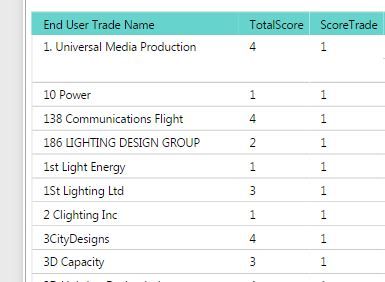
The 3rd column contains a score and it is set to 1 for a selected group of texts that is coming from another excel file.
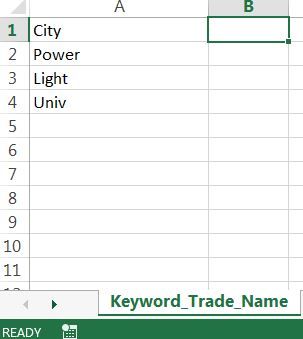
I have a table named the same in my Report and when the text matches it to the one in the list, the score is set to 1 for that entry. The excel is for the purpose that anyone can enter the values and just have to do a refresh in the Power BI to update the score for those set of values.
Below is the code that is doing it -
ScoreTrade = IF(
SUMX(Keyword_Trade_Name,
FIND(
UPPER(Keyword_Trade_Name[Trade_Name]),
UPPER(Table_Test[End User Trade Name])
,,0
)
) > 0,
1,
0
)
I am hardcoding the value to be 1(in bold above) in this case here but I don't want it to do that way. I want it to be taken from an excel file and the value can be set by the user (maybe 2 , 3 but same for all the keywords in that table). Can you suggest a way to do that so that I don't have to hardcode it but maybe use the same excel sheet to add another column with the value ?
I am hardcoding the value to be 1(in bold above) in this case here but I don't want it to do that way. I want it to be taken from an excel file and the value can be set by the user (maybe 2 , 3 but same for all the keywords in that table).
According to your description, you should be able to use the same excel sheet "Keyword_Trade_Name" to add another column called Score with the value like below.
Then use MAX function which returns the largest numeric value in a column(as the Score value is the same for all the keywords in that table, it will return that value) like below to calculate "ScoreTrade" for "End User Trade Name".
ScoreTrade =
IF (
    SUMX (
        Keyword_Trade_Name,
        FIND (
            UPPER ( Keyword_Trade_Name[Trade_Name] ),
            UPPER ( Table_Test[End User Trade Name] ),
            ,
            0
        )
    )
        > 0,
    MAX ( Keyword_Trade_Name[Score] ),
    0
)
Regards
4 Replies
 abhishekpati86
Hi All,
Here is the requirement. I have the below matrix from a dataset containing some text values in End User Trade Name.
The 3rd column contains a score and it is set to 1 for a selected group of texts that is coming from another excel file.
I have a table named the same in my Report and when the text matches it to the one in the list, the score is set to 1 for that entry. The excel is for the purpose that anyone can enter the values and just have to do a refresh in the Power BI to update the score for those set of values.
Below is the code that is doing it -
ScoreTrade = IF(
SUMX(Keyword_Trade_Name,
FIND(
UPPER(Keyword_Trade_Name[Trade_Name]),
UPPER(Table_Test[End User Trade Name])
,,0
)
) > 0,
1,
0
)I am hardcoding the value to be 1(in bold above) in this case here but I don't want it to do that way. I want it to be taken from an excel file and the value can be set by the user (maybe 2 , 3 but same for all the keywords in that table). Can you suggest a way to do that so that I don't have to hardcode it but maybe use the same excel sheet to add another column with the value ?
- abhishekpati86
Hi All,
Here is the requirement. I have the below matrix from a dataset containing some text values in End User Trade Name.
The 3rd column contains a score and it is set to 1 for a selected group of texts that is coming from another excel file.
I have a table named the same in my Report and when the text matches it to the one in the list, the score is set to 1 for that entry. The excel is for the purpose that anyone can enter the values and just have to do a refresh in the Power BI to update the score for those set of values.
Below is the code that is doing it -
ScoreTrade = IF(
SUMX(Keyword_Trade_Name,
FIND(
UPPER(Keyword_Trade_Name[Trade_Name]),
UPPER(Table_Test[End User Trade Name])
,,0
)
) > 0,
1,
0
)I am hardcoding the value to be 1(in bold above) in this case here but I don't want it to do that way. I want it to be taken from an excel file and the value can be set by the user (maybe 2 , 3 but same for all the keywords in that table). Can you suggest a way to do that so that I don't have to hardcode it but maybe use the same excel sheet to add another column with the value ?
 v-ljerr-msft
Microsoft Employee
I am hardcoding the value to be 1(in bold above) in this case here but I don't want it to do that way. I want it to be taken from an excel file and the value can be set by the user (maybe 2 , 3 but same for all the keywords in that table).
According to your description, you should be able to use the same excel sheet "Keyword_Trade_Name" to add another column called Score with the value like below.
Then use MAX function which returns the largest numeric value in a column(as the Score value is the same for all the keywords in that table, it will return that value) like below to calculate "ScoreTrade" for "End User Trade Name".
ScoreTrade =
IF (
    SUMX (
        Keyword_Trade_Name,
        FIND (
            UPPER ( Keyword_Trade_Name[Trade_Name] ),
            UPPER ( Table_Test[End User Trade Name] ),
            ,
            0
        )
    )
        > 0,
    MAX ( Keyword_Trade_Name[Score] ),
    0
)
Regards
- abhishekpati86
Hi v-ljerr-msft,
Thanks for the solution, now my Director wants it to be more dynamic.
So now the data should look something like this
Is there a way to extract the possible values in the above manner ?
Thanks a lot for your help.