Forum Discussion

Error message when converting unix time
I have a dataset coming from an SQL server in PowerBI. The dataset is currently 21,000+ rows. There is a column that has a Unix timestamp which I am trying to convert to regular timestamp. I am using the below formula:
#datetime(1970, 1, 1, 0, 0, 0) + #duration(0, 0, 0, [value])
When typing in the formula, BI does not show any error with the formula, however, when executed the following error message comes up:
"Expression.Error: The Duration operation failed because the resulting duration falls outside the range of allowed values."
How can I either expand the range or use a different formula that will not result in an error message?
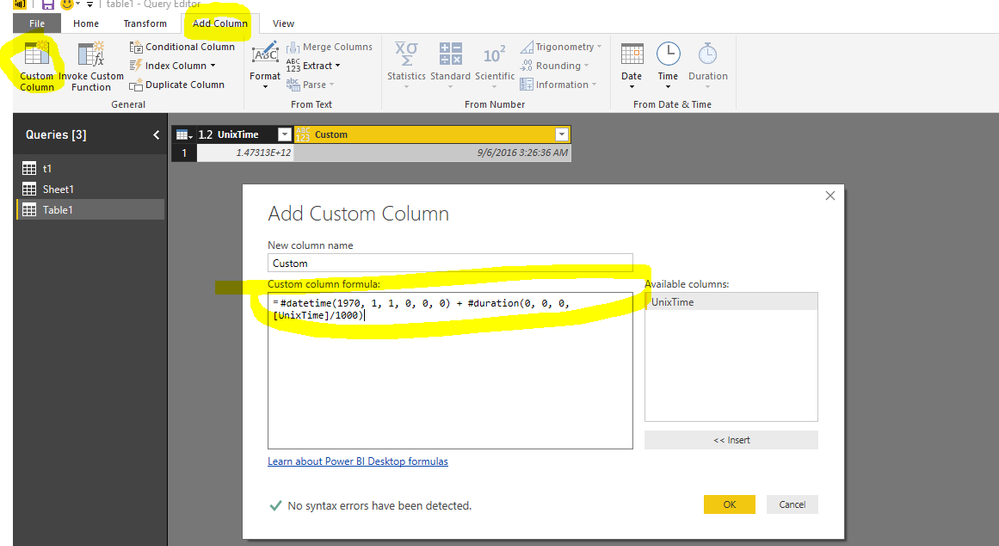
You can add a custom column
#datetime(1970, 1, 1, 0, 0, 0) + #duration(0, 0, 0, [UnixTime]/1000)
Regards,
Charlie Liao
3 Replies
 v-caliao-msft
Microsoft Employee
You can add a custom column
#datetime(1970, 1, 1, 0, 0, 0) + #duration(0, 0, 0, [UnixTime]/1000)
Regards,
Charlie Liao
- harshaliFrequent Visitor
Yes, that works. Thank you!!
 rasiksawant09Regular Visitor
Thanks a lot.