Forum Discussion

 Helper III
cumulative sum
Hi Everyone
I need help to create a sum of count or percent but my data have no date entry.
this is the measure that i tried to create by it's not working:
cumulative percent = SUMX(FILTER(all(table[products]),table[products]<=max(table[products])),calculate(100.00*(SUMX(all(table[products]),calculate(COUNT(table[products])))/1050)))
here i was trying to do a cumulative sum of the percentage where my data size is 1050 hence fixed.
below is the sample of the table visualization i have for my data. i used the quick calc for the count and % of count of products which is a unique text entries. the last column what i am trying to create.
| Type | count of products | % total count of products | Cumulative percentage |
| 1 | 500 | 47.62% | 47.62% |
| 3 | 330 | 31.43% | 79.05% |
| 2 | 220 | 20.95% | 100.00% |
thanks in advance.
3 Replies
 Sean
SeanCommunity Champion
Continued from here...
http://community.powerbi.com/t5/Desktop/measure/m-p/136791#U136791
Then just add these 2 Columns
% of GT =
DIVIDE ( 'New Table'[Count of Type], SUM ( 'New Table'[Count of Type] ), 0 )

Cumulative % =
DIVIDE (
    'New Table'[Cumulative Sum Column],
    SUM ( 'New Table'[Count of Type] ),
    0
)
Hope this helps! :smileyhappy:
 theo
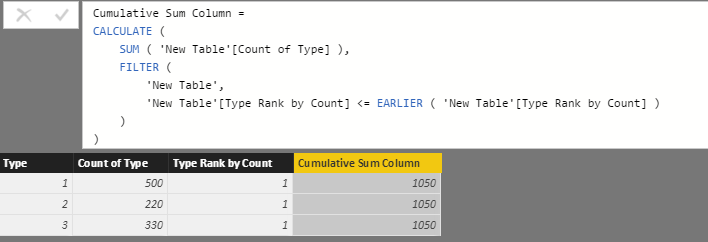
theothanks, i tried but i have different result from what is expected using the summarize formula. the rank is 1 for all, see below. I need that to be corrected first before i can use the solution you have proposed. hope you can advise on the summarize formula error.
in addition, i realized the result will be fixed bu i need something that could change at a later stage. i have another column for the product code, then new ones will be added later. i will then need the cumulative sum based on the new column (product code) and not the type. thank you so much for providing time to help.
 v-huizhn-msft
Microsoft Employee
Hi theo,
You shoud use the [Type] rather than [Type Rank By Count].
Best Regards,
Angelia