Forum Discussion

Command line to update data sources
Is there a way to update my PBIX files without manually opening and refreshing them? I'd like to have a script run and update my data.
Any Ideas?
(For why I'm not using the Power BI Online updating, it doesn't currently support my internal company OData information source, and I'd like to automate the update process)
4 Replies
- mllopisCommunity AdminHi Jared,
Currently there is no way to programmatically refresh a PBIX file.
However, on-prem OData feeds should be refreshable using the Personal Gateway. Could you elaborate on what issues you found trying to do this?
Thanks,
M.- djnwwImpactful Individual
Hi All,
Is Power BI working on command line functionality ?
Personal Gateway & Enterprise Gateway are great, but ONLY for on-prem data. What we need is a way to refresh data that is being retrieved from an API on a daily basis (ie. coming from an External source which is not on our premises).
Regards,
Daniel
 jared168Microsoft Employee
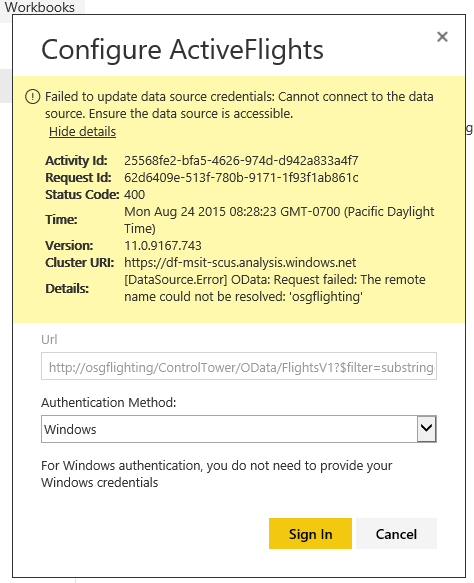
The OData sources I have do not seem to work through the Personal Gateway. I think PowerBI.com tries to access them through a public interface, which would not be possible. It must be accessed from inside my corporate network. Here is the error I get:
"Cannot connect to the data source"
- Shahid12523Community Champion
Use Power BI Report Server (if you have it) → supports scheduled refresh.
Use the Power BI REST API + a service principal → refresh dataset in the Service (if you can publish).
For pure .pbix refresh on-prem:
Use Power Automate Desktop / Task Scheduler + a script to open Power BI Desktop and send keystrokes to refresh & save.
Or use third-party tools like Power Update (was popular back in 2015) to automate PBIX refresh and saving.
👉 Out of the box: no command-line refresh for PBIX. Needs either API, Report Server, or external tool.