Forum Discussion

Calculation between two tables
Hello everybody,
I'm new to PowerBI and have a question about creating a query / formula that can calculate a value from cells of different tables.
I have a table called 'Werkzaamheden' and a table called 'Kosten' These are shown below:
Werkzaamheden
Kosten
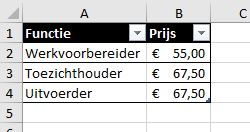
Now. I want to create a query / formula that calculates, for each row in the Werkzaamheden table, what the multiplied costs are.
This should be done as follows:
Werkzaamheden[Duur] * (Kosten[Prijs] from the row at which Kosten[Functie] is equal to Werkzaamheden[Functie])
Can anybody help me with this? I can't seem to figure it out...
 Anonymous8 years ago
I think you are trying to create a MEASURE (meetwaarde), you should create a COLUMN (kolom). Add the column to the [Werkzaamheden] table and not the [Kosten] table. I just tried and it worked :)
7 Replies
- AnonymousNot applicable
As jthomso mentioned, If you create a link between the two Functie columns, you can add a calculated column to the Werkzaamheden table:
KostenWerkzaamheden = Werkzaamheden[Duur] * RELATED(Kosten[Kosten])
That one should work :-)
 Michel89Regular Visitor
I've tried adding a column to the table 'Werkzaamheden', but got an error:
Expression.Error: The name RELATED hasn't been recognized.
= Table.AddColumn(#"Type gewijzigd", "KostenWerkzaamheden", each Werkzaamheden[Duur] * RELATED(Kosten[Kosten]))
I don't know what I'm doing wrong?
- AnonymousNot applicable
Are you using PowerBI Desktop? Looks like your adding the column in the wrong place (the query editor instead of in the table). Check out this video about how to add a calculated column to a table:
https://www.youtube.com/watch?v=62mLfiNcqVM
- jthomsonSolution Sage
Shouldn't be much wrong with your formula as it is assuming your two tables are related on the Functie column, you may need to use RELATED to pull through your Prijs value