Forum Discussion

Anonymous
7 years agoNot applicable
Average in a table per item
Hi
The avarage cost doesn't work - see beneath:
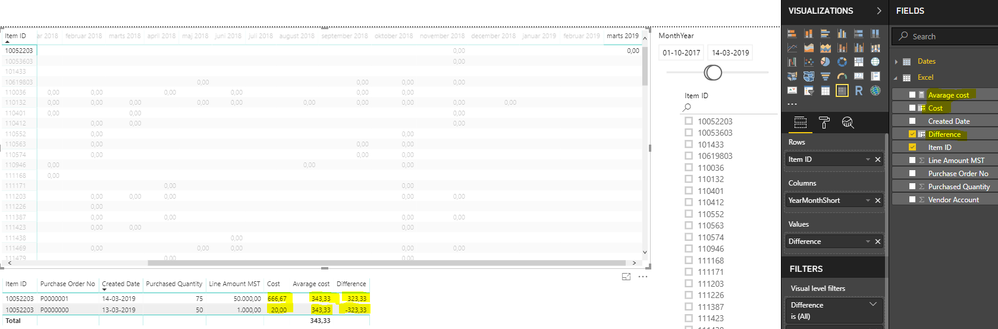
The cost is calculated from quantity and line amount.
The avarage cost is calculated as (but it does not work - in the above photo the avarage cost is 343,33 but i'll think it is wrong and it should be 408):
Avarage cost =
AVERAGEX(
'Excel'
;var thisYear = RELATED('Dates'[MonthYear])
return
CALCULATE(
AVERAGE('Excel'[Cost])
;ALLEXCEPT('Excel';'Excel'[Item ID])
;'Dates'[MonthYear] = thisYear))
The difference is calculated as: cost minus avarage cost (but it does not work because of the avarage cost)
It should be 258,67 in the first line and -388 ind the secound line, and therefore the amount in the table top left should be showing (difference coloum) the total amount in March 2019 = -129,33.
Hope someone can help me quick :-)
Regards,
Elena
2 Replies
 TeigeGao
Solution Sage
Hi ElenaJohansen,
According to your description, my understanding is that you want to calculate the average data based on the item id. In this scenario, we can use the following DAX query:
Average cost = CALCULATE(AVERAGE(Excel[Cost]),FILTER(ALLEXCEPT(Excel,Excel[Item ID]),'Dates'[MonthYear] = thisYear))
Best Regards,
Teige
- AnonymousNot applicable
Hi TeigeGao
I cannot use the DAX query - it tells me following:
Hope you can help me
Best regards
Elena Johansen