Forum Discussion

Title height not initialises when creating visual
- 8 years ago
Hi diaAzul,
Thank you for the clarification.
v-chuncz-msft v-ljerr-msft Since this issue is related to all of visuals including custom visuals.
Can you send this issue to Power BI dev team for further investigation?
Ignat Vilesov,
Software Engineer
Microsoft Power BI Custom Visuals
 8 years ago

Hi v-viig,
Thanks for the suggestion; yes, I am aware of how to extract dimensions from the host options passed during update. However, that is not my problem. The following diagram might make the issue clearer.
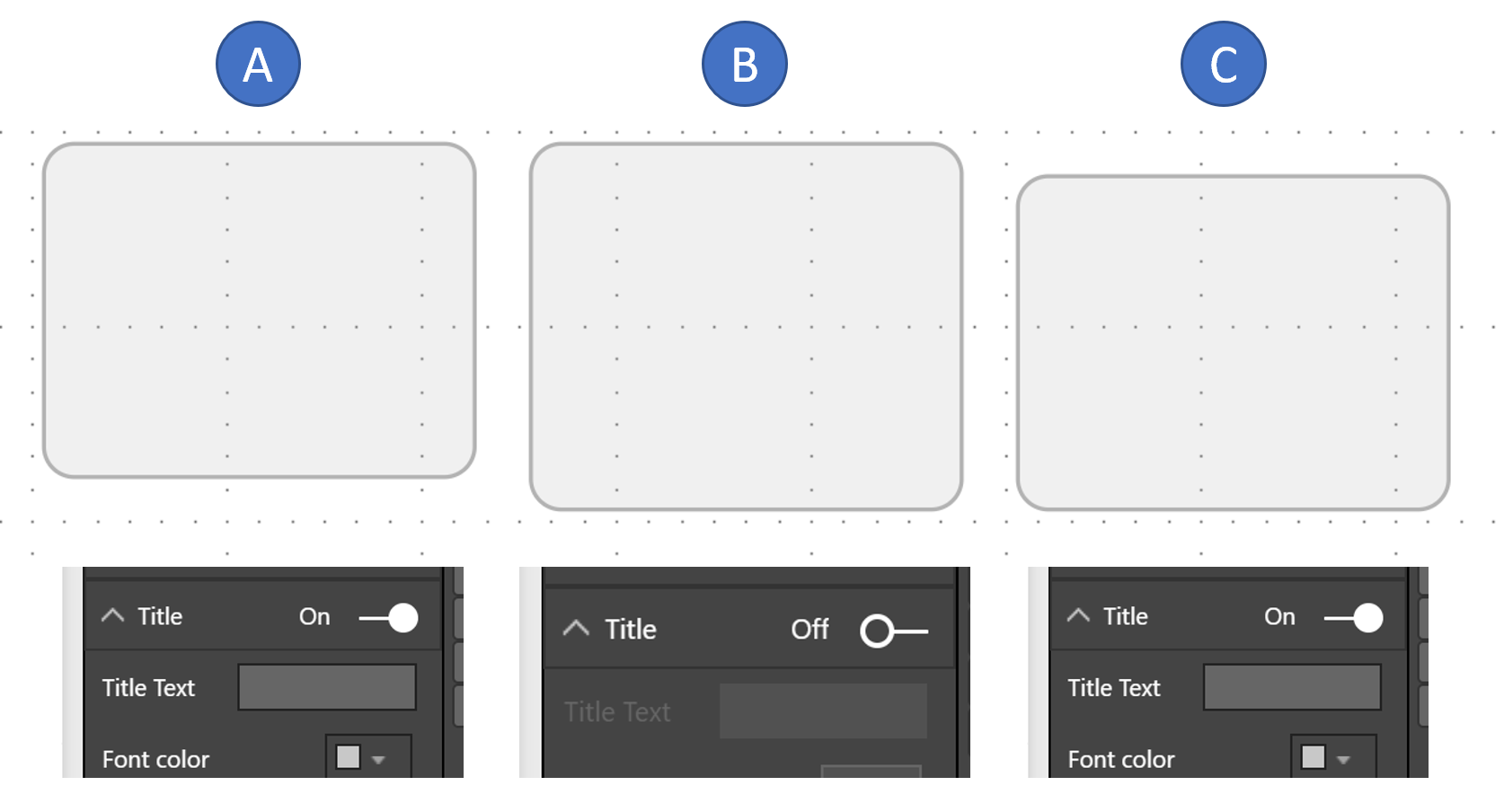
The grey rectangle is the background created by my custom visual. The screengrab below each step (A, B, C) are the settings in the Visualisation panel:
- Step A is when the visual is first created. The option for Title is default to on. The visual is aligned at the top of the frame for the visualisation. However, the size of the frame is 16 px short (both the reported value in options, and also the visualisation viewport). Even if I add an additional 16 px to the rectangle manually, I cannot draw beyond the extent of the frame that is provided by Power BI and so the visual is 16 px short (and truncated if I add 16 px to the rectangle).
- Step B - Turn off the title. No options reports the full size of the iFrame, and permits drawing of the full size of the rectangle.
- Step C - Turn Title back on. The top left hand origin of the iFrame is lowered 16px and the reported height of the iFrame is reduced by 16px. Rectangle draws and is positioned as it should be.
The point I am trying to raise is that the visual should draw as C when it is created, not A; and it should not be necessary to switch of the Title and then switch it back on again to get the visual to draw correctly.
The visual (pbviz file) and link to github source code is at https://diaazul.github.io/
Thanks

Hi diaAzul,
Thank you for the clarification.
v-chuncz-msft v-ljerr-msft Since this issue is related to all of visuals including custom visuals.
Can you send this issue to Power BI dev team for further investigation?
Ignat Vilesov,
Software Engineer
Microsoft Power BI Custom Visuals