Forum Discussion

Authorization Code Grant Flow (Power BI Embedded)
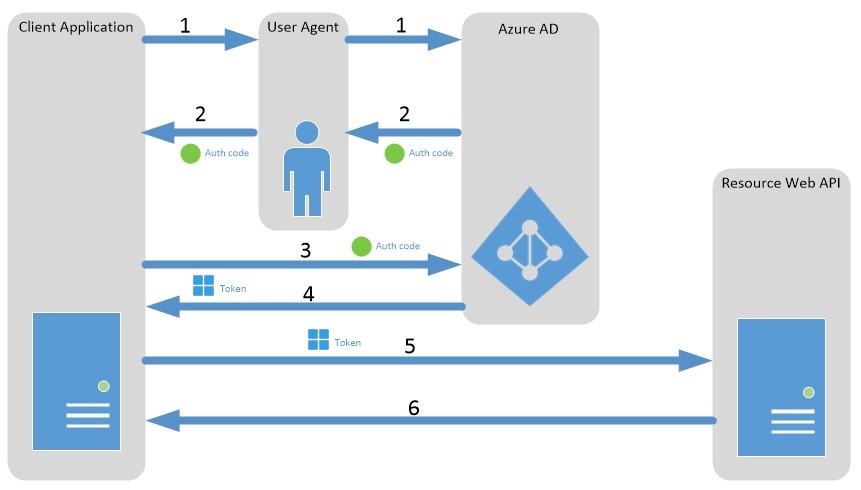
I found this diagram with the corresponding explanation here which I am not sure whether my understanding of the flow is correct. Here is my understanding about the diagram above and would be appreciated if someone could correct me if I am wrong.
- The client application redirects the User Agent (The "master account" with Power BI Pro License and with Azure Global Admin Role in third-party embedding scenario) to the Azure AD authorization endpoint and lets the User Agent authenticates via Azure username and password.
- The Azure AD authorization endpoint redirects the user agent back to the client application with an authorization code.
- The client application requests an access token from the Azure AD token issuance endpoint by providing the authorization code.
- The Azure AD token issuance endpoint returns an access token and a refresh token.
- The client application uses the access token to authenticate and call to the Web API INCLUDING obtain an embed token for third-party embedding.
- After authenticating the client application, the web API returns the requested data.
Along the process, three different type of tokens were received. Each of their purposes is stated below:
- Authorization code: Used for verification with Azure AD token issuance endpoint to obtain an access token
- Access token: Used to call Power BI Web API
- Refresh token: Used to request additional access tokens
- Embed token: Used along with embed URL and embed report ID for embedding in custom web application. (Embed Token, Embed report ID and Embed URL are the 3 items required to do 3rd party embedding)
Thanks in advance for the help.
14 Replies
- TedPattisonMicrosoft Employee
The Authorization Code Grant Flow is used to authenticate the current user but never the master user account. Therefore, the Authorization Code Grant Flow is used for first-party embedding with the user-owns-data model and never with third-party embedding and the app-owns-data model.
If yiu are using third-party embedding, you should use the User Credential Flow which is not an interactive flow. Here is a simple example.
public class PbiEmbeddedManager {

  private static string aadAuthorizationEndpoint = "https://login.microsoftonline.com/common";
  private static string resourceUriPowerBi = "https://analysis.windows.net/powerbi/api";

  private static string applicationId = ConfigurationManager.AppSettings["application-id"];
  private static string userName = ConfigurationManager.AppSettings["aad-account-name"];
  private static string userPassword = ConfigurationManager.AppSettings["aad-account-password"];

  private static string GetAccessToken() {

    AuthenticationContext authenticationContext = new AuthenticationContext(aadAuthorizationEndpoint);

    AuthenticationResult userAuthnResult =
      authenticationContext.AcquireTokenAsync(
        resourceUriPowerBi,
        applicationId,
        new UserPasswordCredential(userName, userPassword)).Result;

    return userAuthnResult.AccessToken;
  }

}
Another key point is that you must grant permissions (i.e consent) to the Azure AD application for the master user account before you run this flow because this flow will fail if Azure AD attempts to prompt the user to consent to the application's required permissions.
I assume you are using third-party embedding and the app-owns data model and not first-party embedding with the user-owns-data model. Is this correct?
- AnonymousNot applicable
Thanks for your reply.
Yes, I plan to use third-party embedding and the app-owns data model for my project because one of the specifications is that users can view the report directly when they logged into my web application, without having a Power BI account. This is the reason I chose third-party embedding.
Another specification is that when a user logged into my web application, he/she is only allowed to view the Power BI contents that he/she has permission to, which I am not sure whether this specification can be fulfilled in third-party embedding (where one embed token for each content, consumed by any user that is able to access the page).
Is this possible in Power BI Embedded third-party scenario? Thanks in advance.
 nfadiliFrequent Visitor
My team has very similar requirements to what you've described here and we are unable to discern a scalable way of soving it. The only idea we can see might work is having multiple of these master accounts, each with different permissions and mapping our user roles to them as requests for embedded content come in. This is definitely not an ideal solution.
Have you figured out anything new regarding this problem? Does anyone on the Power BI team have a suggestion for handling this?Thanks!
- AnonymousNot applicable
Hi Ted! Thanks for your detailed response with code examples. Something I think would be useful and would allow anyone to implement this flow in any language would be an example REST API call with the payload outlined and possibly where to acquire each component of that payload.
I've been searching for a week off and on and it's extremely frustrating for something so simple as getting a bearer token to make requests to be so obscure or only represented in Java/C# or other lower-level languages where you utilize a library from Microsoft. Often times with no reference on where to obtain those libraries, how to use them, where this code should run... etc
Is there any documentation on that specifically? Or would you be so kind as to give us this example?
Signed,
a very frustrated developer who has set up this exact situation using other services and has never had this much trouble.
